
Inspiring
July 20, 2017
Answered

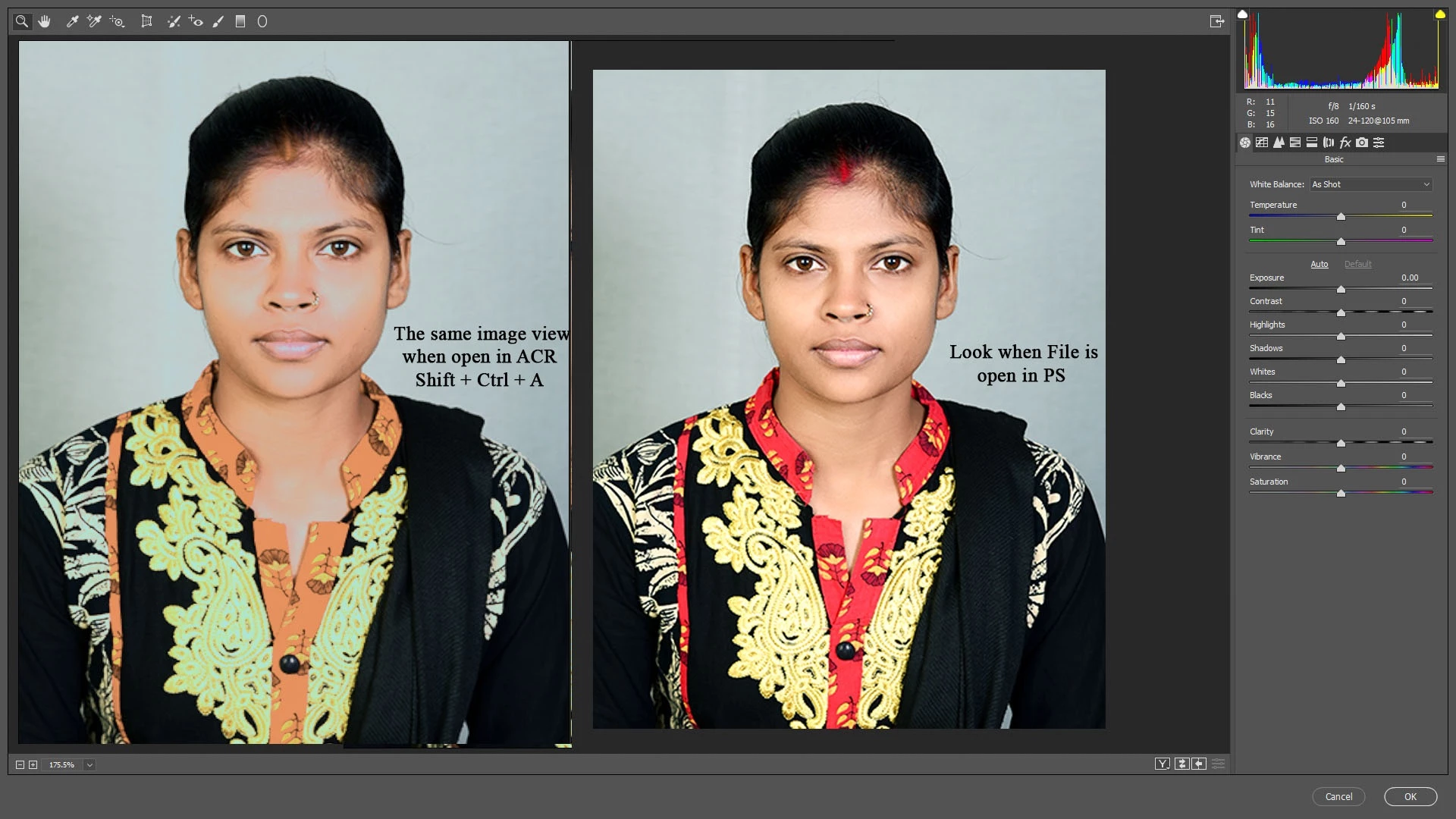
Camera Raw Display problem after updating Camera Raw CC today
  • July 20, 2017
  • 5 replies
  • 4110 views

Thing working absolutely fine till today, after updating the Camera Raw CC today, the display of ACR is totally changed.

I am using Single monitor so no two display profiles.

I am unable to use ACR . Please help.

This topic has been closed for replies.
Correct answer skeshri999

With thanks to Andrew Rodney

Turning OFF GPU acceleration in ACR preferences worked

5 replies

JJMack
Community Expert
Community Expert
July 21, 2017

To me it looks like ACR it showing you, your colors are off the chart. Look at the histogram ACR shows amf the warnong overlay.

JJMack
Inspiring
July 21, 2017

Display difference when I switch off and on the Graphic Processor...

I see no changes in Histogram at all.

JJMack
Community Expert
Community Expert
July 21, 2017

You can see from my screen capture I do not see image like you do with GPU enabled in ACR.  I wrote you may well have a problem with you display drivers GPU support.  Do you have the latest driver installed? It also look like you are using an old windows version. Which one.

JJMack
JJMack
Community Expert
Community Expert
July 20, 2017

Can you tell us what this part of a screen catures is showing us.   It look like is part of some ACR dialog where ACR is bneing use as a filt because of the ACR buttons.  Filtering a layer with side by side images perhaps as a smart filter.  Text on one of the images look like your using windows for the text is Ctrl not CMD.  Windows Photoshop shortcut  Shift+Ctrl+A does open ACR as a filter.

However I have no idea of how you made the side by side image layer. Or why you scaled the images to diffent sizes or what the actual image size is. If the images source was a single raw file converted into RGB images using the same ACR raw conversion setting in two ACR versions.  You provide no information about the software version of Photoshop and ACR. Or how the images were processed in Photoshop. The side by side images are different why  I do not know how you processed them so I hane no idea why they are not the same  or closer to the same.

I havd not installed today ACR update yet  so  I can make a test where I know thing are the sane.   As Single RAW fle converted with ACR setting I create in Photoshop CC 2017 ACR 9.10.1.

JJMack
Inspiring
July 20, 2017

Thanks for your reply.

I created it in photoshop with two screen captures to make understand the difference of colour change.

Software  is cc 2017 and camera raw plugin 9.12.0.748 recent updates of 18th july

Turning off the GPU acceleration work and its working fine now.

JJMack
Community Expert
Community Expert
July 20, 2017

It may be your Display Adapter GPU Support then My test with GPU enable shows no difference on my machine.

Open RAW file in ACR 9.10.1 opened as smart Object ProPhotoRGB color space 16bit color.

Converted to color space sRGB and Saved a png

Closed CC 2017 and install all the Camera RAW update.for all version of Photoshop and Bridge

Repeated the above process

Opened the two PNG files dragged the ACR 9.12 version over the ACR 9.10.1 and set blend mode to difference the was not difference all pixels turned black.  GPU ACR preference is ON in my ACR preferences.

JJMack
skeshri999AuthorCorrect answer
Inspiring
July 20, 2017

With thanks to Andrew Rodney

Turning OFF GPU acceleration in ACR preferences worked

Participant
July 20, 2017

Yes, I confirm turning off GPU acceleration does indeed work! Thanks!

Participant
July 20, 2017

My display area is black...no image comes up in the image area since updating to latest Camera Raw CC today!

Participant
July 20, 2017

Same here.