
Answered
Camera raw in a sector of the image
Hi,
I have an image made by 2 very different subjects, so I'd like to perform a Camera raw tuning only in the upper half.
Is it possible to border the action are of that function?

Hi,
I have an image made by 2 very different subjects, so I'd like to perform a Camera raw tuning only in the upper half.
Is it possible to border the action are of that function?
@gtsolid wrote:
I can share this, i'd like to perform a tuning in the upper part.
So: 1) apply Smart Filter first and then open the Camera Raw Filter? where is the command to apply a mask?
There is a button in the Layers panel to create a mask, or you can draw a selection and use one of the commands on the Layer > Layer Mask submenu.
But probably the fastest and simplest way is what @marliton already suggested in their reply: Convert for Smart Filter (Smart Object), make a selection, then choose Filter > Camera Raw Filter. When a selection exists over a Smart Object, Photoshop automatically converts the selection to a mask when you open the filter — no need to manually choose any mask command or button. This shortcut works with some other types of layers, such as adjustment and fill layers.
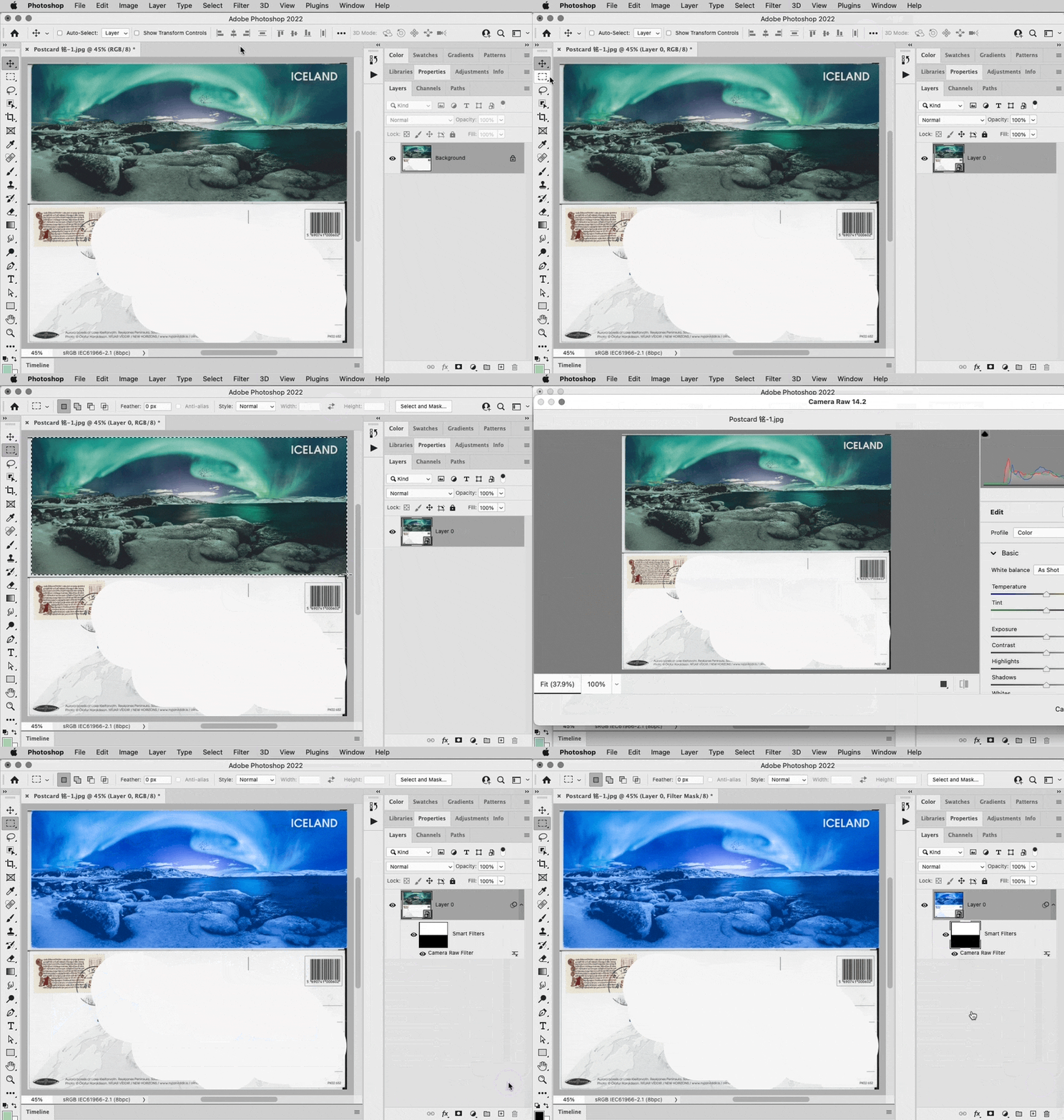
My example mask might not match what you want because I drew a simple rectangle; if you want the mask to more accurately match the rounded corners of the design in the top half, you can of course edit that mask to match the content.
Already have an account? Login
Enter your E-mail address. We'll send you an e-mail with instructions to reset your password.
 AdChoices