Participant
June 22, 2018
Answered

Camera Raw update

  • June 22, 2018
  • 2 replies
  • 502 views

I did Camera Raw update by Creative Cloud, now I can't open a CR2 file. PS close immediately when I open a file CR2 ??? I re-installed everything from Abode, PS, Bridge... in my Macbook pro and I have the same trouble. Please, could you help me ?
    This topic has been closed for replies.
    Correct answer

    Hi

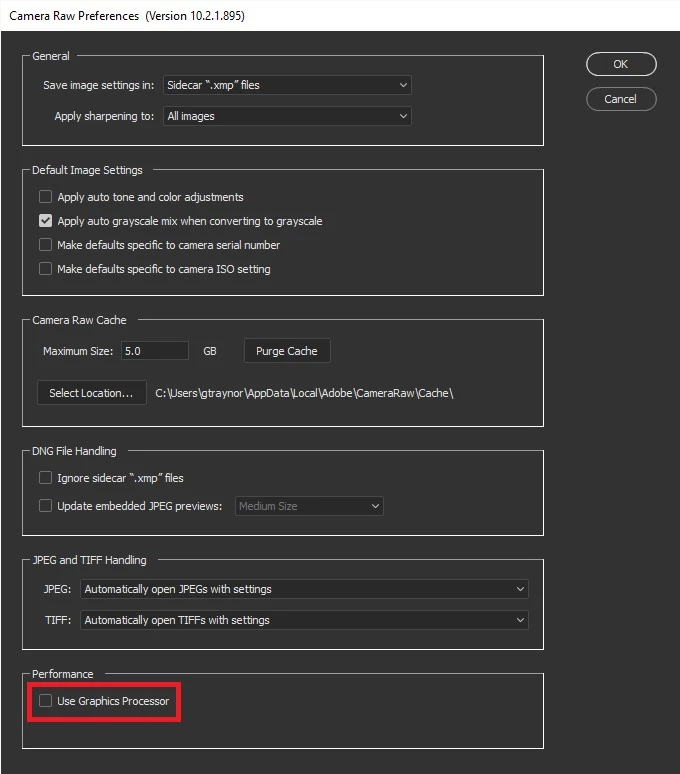
    Try disabling this option in Camera Raw preferences, in Photoshop go to Edit > Preferences > Camera Raw, then restart Photoshop

    2 replies

    Correct answer
    June 22, 2018

    Hi

    Try disabling this option in Camera Raw preferences, in Photoshop go to Edit > Preferences > Camera Raw, then restart Photoshop

    Participant
    June 22, 2018

    I did, but the result it's the same ! I have a message under this box, in french sorry "l'acceleration du processeur a été désactivé en raison d'une ... "

    Another thing, when I go in library folders, support application,  adobe and Plug-Ins, I have CC folder, file formats then Camera Raw.plugin. If I click on, Adobe Premiere opens ?!?

    I don't understand, everything worked yesterday before this upgrade !

    Many thanks for your assistance

    Dimitri

    Mohit Goyal
    Community Manager
    Community Manager
    June 22, 2018

    Hi dimitrii,

    We're really sorry for all the trouble. Could you please let us know the camera make and model you are using now? Also, is your Photoshop is crashing when open cr2 files?

    Regards,

    Mohit

    Participant
    June 22, 2018

    I use different cameras from Canon -EOS1DX MArkII and 5D- but the trouble stay the same !