



Camera Raw version 9.3 corrupted PS plugin
Since about a week I am not able to load pictures made with Canon EOS 80D any more in Photoshop version 2017.1. The camera Raw plugin info states Camera Raw 9.3 is installed, opening a RAW picture from out of LR into PS or directly in PS provides an error stating:
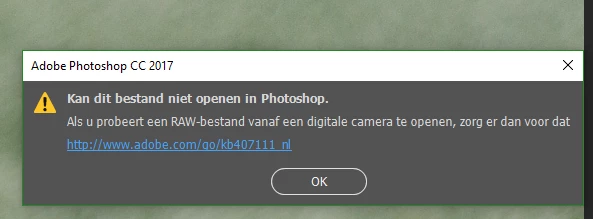
This indicates that Camera Raw is not up to date.
Replacing Camera Raw is not possible with the manual update links either, and the CC menu does not allow any changes either:
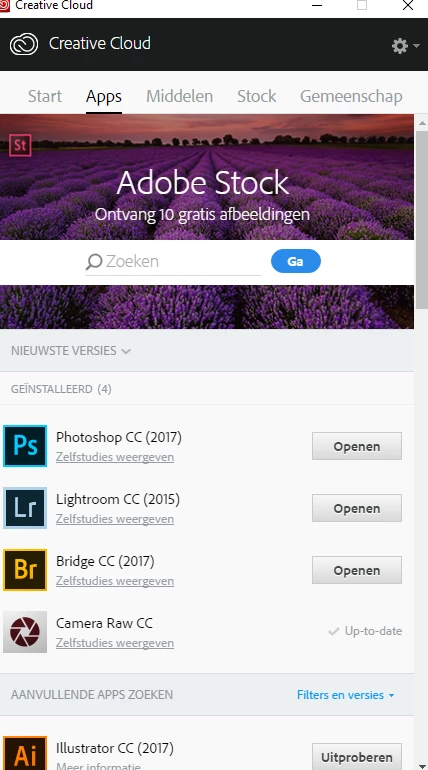
In short, Camera Raw does not really plug-in in PS, and I cannot use PS any more.
Adobe support has reported it as a bug 3 days ago, but nothing seems to happen since.
This is a serious Bug. I have the same problem reported 3 days ago, and it has been stated as Bug by the technician
I cannot use photoshop any more because my EOS 80D RAW requires Version 9.10 but the Camera Raw plug-in is back on 9.3 now; which is insufficient
Strangely enough the problem has started recently, although I have been working with my 80D RAW pictures in Lightroom about all winter without a problem
Camera Raw 9.10 is needed is stated by PS, but 9.3 does not feel like making any space.
Anyone to get this problem boosted?.
 AdChoices