
Can anyone explain the voodoo behaviour of buttons in Photoshop Scripting dialogs?
A quick explanation of my problem (well, not a problem really, now that I have found the cause - just a question about why this occurs...). I'm creating a plugin for Photoshop CC to automate several of my processes. I use dialog windows created with JavaScript to interact with the user and these dialogs have buttons. So far all is simple.
I discovered that one dialog converted all the buttons to rounded ends and the cause mystified me for some time. The code that created the problem appears to be straightforward :
dlgPrefs.pnlButtons.btnBack = dlgPrefs.pnlButtons.add ('button', [250, 10, 350, 45], 'Cancel');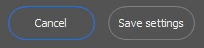
Then quite by accident I retitled the 'Cancel' button as follows :
dlgPrefs.pnlButtons.btnBack = dlgPrefs.pnlButtons.add ('button', [250, 10, 350, 45], 'Back');
and low and behold all the buttons reverted to standard, square ends...
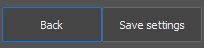
I am guessing that the word 'Cancel' is reserved in Photoshop's implementation of JavaScript, but for the life of me I can't find anything in the Adobe documentation... Has anyone out there seen this behaviour before or can you put me out of my misery with an explananttion?
Thanks in anticipation.
 AdChoices