
February 7, 2017
Answered

Can anyone tell me what I am doing wrong? I am still using the 5.0 version, and it has worked fine up until today when the Tool feature will not allow me to enter text into a project I am working on. What can I do to correct this?

  • February 7, 2017
  • 3 replies
  • 1782 views

I am still using PhotoShop 5.0 and it has worked fine for me up until today, when I could not get the Tools feature to enter text into a project I am working on.  Apparently I accidentally did something to cause this, as it has always worked fine previously.  Can anyone suggest what I may have done to cause this problem?

    This topic has been closed for replies.
    Correct answer Jeff Arola


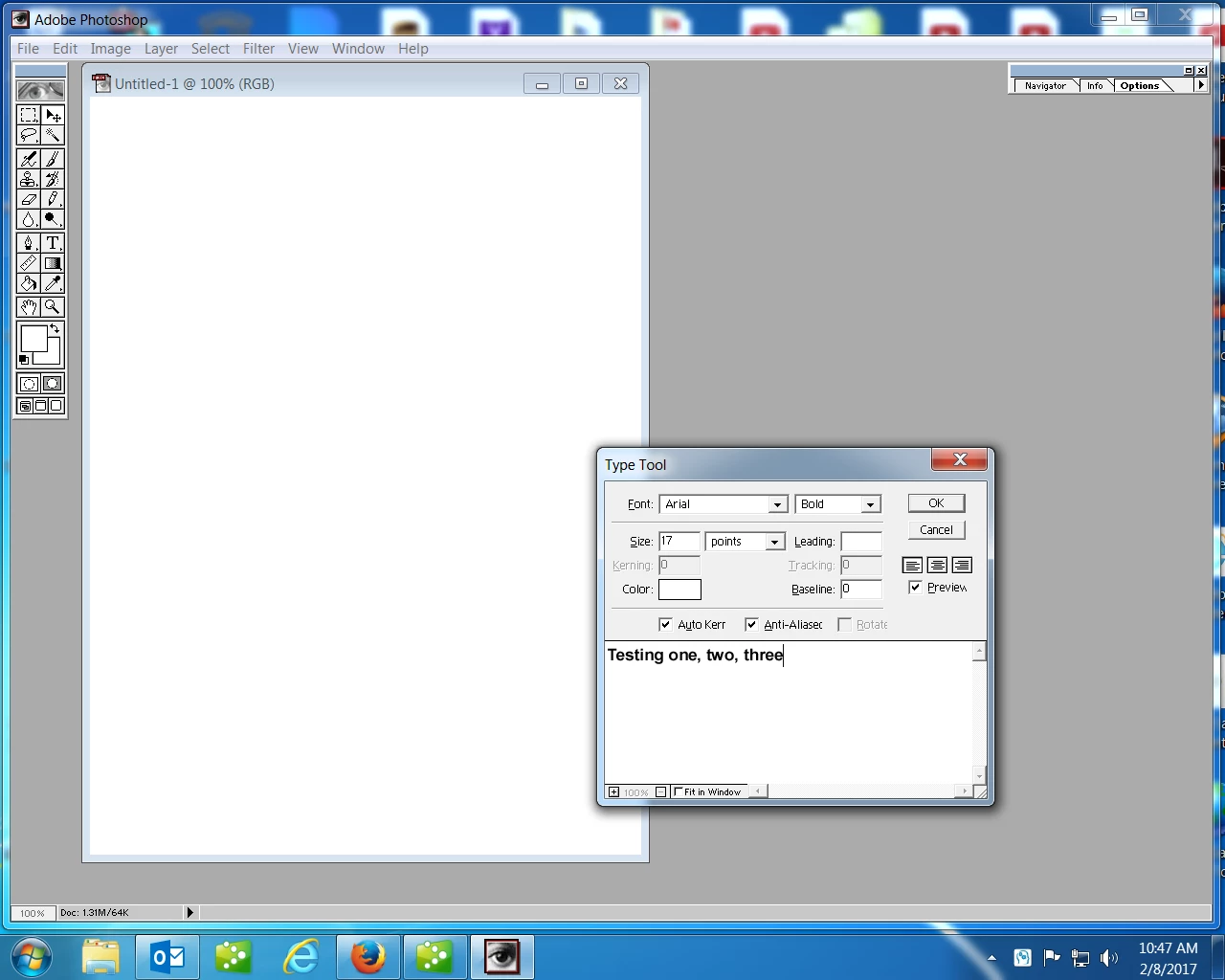
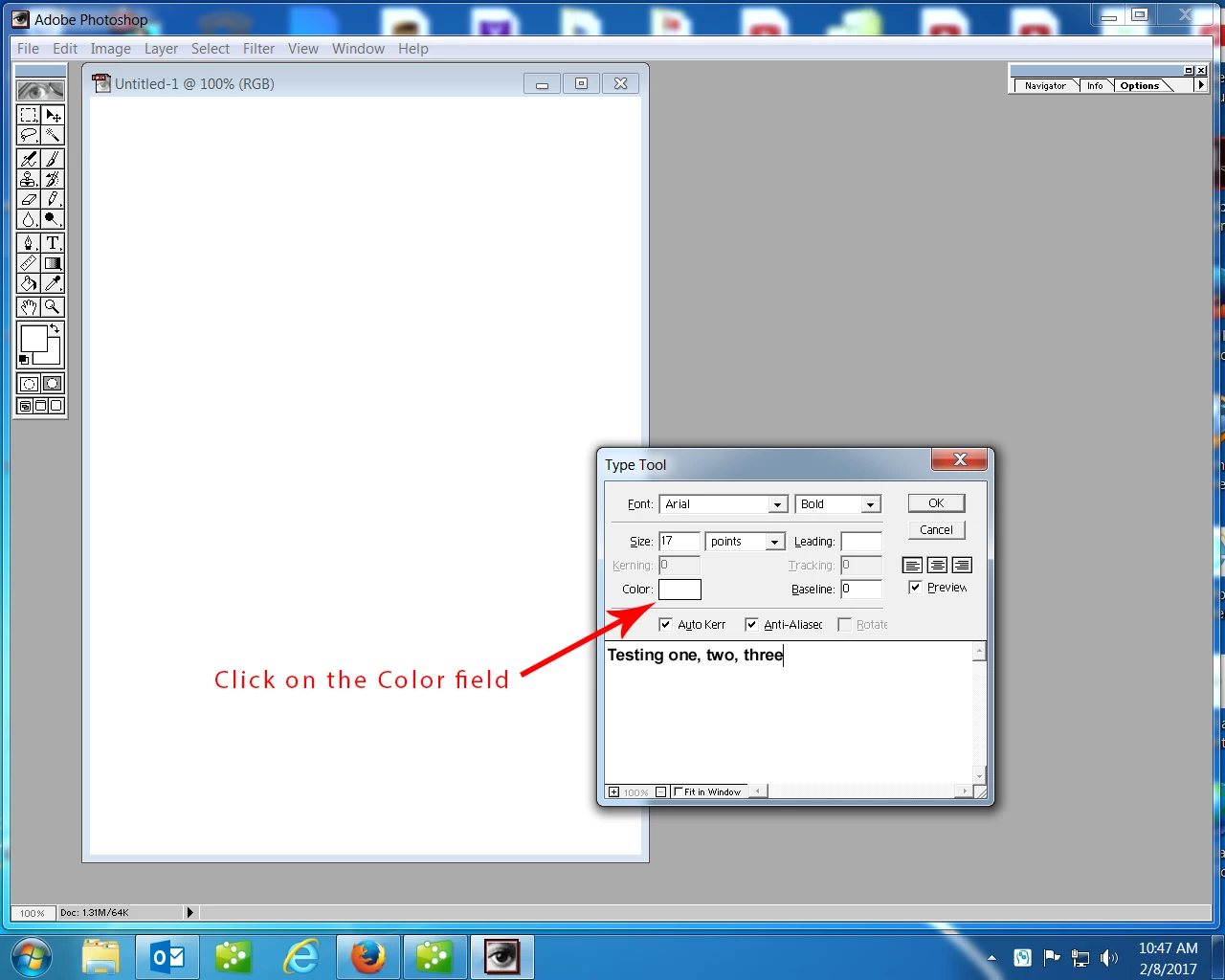
    Thanks for the screenshot.

    It looks like your Text color is set to white.

    Click on the field next to Color to change to a different color.

    3 replies

    Trevor.Dennis
    Community Expert
    Community Expert
    February 8, 2017

    ED J wrote:

    I am still using PhotoShop 5.0 and it has worked fine for me up until today, when I could not get the Tools feature to enter text into a project I am working on. Apparently I accidentally did something to cause this, as it has always worked fine previously. Can anyone suggest what I may have done to cause this problem?
    Save yourself a lot of messing about, and Reset All Tools.  That will get you back to the defaults.

    If this does not work for you, test the Type tool in a new image as suggested by cmgap.  If the Type tool is not working there, reset Preferences.  With pre CC versions that's  hit Shift Ctrl Alt, _right_ after opening Photoshop.  If you do not see a dialog box asking if you want to reset Preferences, you were not quick enough.  Not resetting Preferences is always a last resort because it is so annoying!

    cmgap
    Community Expert
    Community Expert
    February 8, 2017

    Yes - the question I am trying to answer is if this behavior is specific to this document or all documents. If it's in the document are you using history? Have you saved, closed and reopened?

    February 8, 2017

    I have tried it on other documents and it does not work on those, either.  I have also tried closing the document, reopening it and trying it again...still not success.  I am a novice at this...what is "History?"  Where do I look to find that?  Thanks for your suggestions.

    cmgap
    Community Expert
    Community Expert
    February 7, 2017

    Can you enter text in a new (different) document?

    gener7
    Community Expert
    Community Expert
    February 7, 2017

    Are you talking about Photoshop CS5 or the much older (1998) Photoshop 5.0?  What version of Windows do you have?

    February 8, 2017

    It is Adobe Photoshop vrsion 5.0.  I purchased it in March of 1999.  When I switched to Windows 7 a couple of years ago, my computer tech modified it so that it would work on Windows 7 and it has worked perfectly until today when I ran into this problem of it not allowing me to enter any text.

    gener7
    Community Expert
    Community Expert
    February 8, 2017

    Sometimes I make the mistake of having my Text color set to White, the same as my Background.

    A Type Tool reset should clear this up.