Question
Can I delete old versions of UXP / Plugin Storage / PHSP folders?
Hello! In an attempt to figure out what was loading up my C drive so much, I got to the folder C:\Users\UserName\AppData\Roaming\Adobe\UXP\PluginsStorage\PHSP ... more than 10 GB, which would be very useful to me if it could be freed up. As far as I can guess, folders 22-25 belong to previously installed versions of Photoshop:
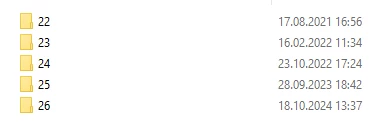
Folders 25 and 26 seem to be almost identical in content and size. Similar to how previous settings are usually imported into a new version.
So, can someone please give me a hint? Maybe someone has already done this before. What is sacred about these folders? And can I delete folders 22-25 without any qualms of conscience and consequences for the program's functionality?
 AdChoices