
qil50502578
Participant
June 4, 2018
Question

Can I disable the pop-up warning when "Select Subject" in Photoshop?

  • June 4, 2018
  • 1 reply
  • 1215 views

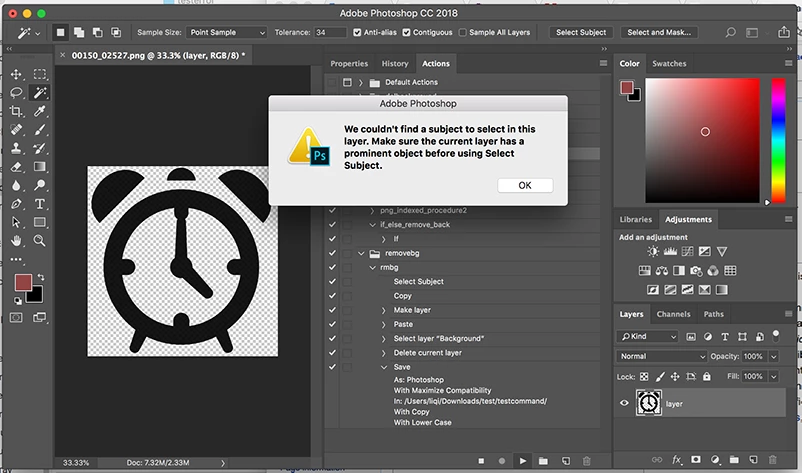
When I do "select subject" on an image, there is pop-up warning( showed as below ) and need to click it to continue the process. I use the batch to run a lot of images one time, this problem would disrupt my process and stop there until someone click it. Or is there any methods to mute all the pop-up warnings?
    This topic has been closed for replies.

    1 reply

    Jeff Arola
    Community Expert
    Community Expert
    June 5, 2018

    Looks like you need a Background layer or layer that's not transparent under the subject layer.

    See if maybe adding a layer underneath of a solid color like white gets rid of the error.

    Also, if you have a layer such as yours where there is an object surrounded by transparency you can select the object by Command clicking on the Layer thumbnail in the layers panel and that should record in an action.

    qil50502578
    Participant
    June 5, 2018

    Your method is great to select an object in this image, but for most of my images, I need to use "Select Subject" to get one subject in the image and delete the background. Is there any way can distinguish the images whether contain an object surrounded by transparency or just normal background around the object.

    Thanks a lot!

    Jeff Arola
    Community Expert
    Community Expert
    June 5, 2018

    I don't think an action can do that, but maybe a script could.

    You could ask over in the Photoshop Scripting forum.

    Photoshop Scripting