Answered
Can I invert a shape layer?
When I create a shape layer, of course the path is closed and the fill is on the inside of the shape. Is there a why to invert this so that the fill is on the outside with an editable "hole" on the inside?
When I create a shape layer, of course the path is closed and the fill is on the inside of the shape. Is there a why to invert this so that the fill is on the outside with an editable "hole" on the inside?
You can create a 'hole' by changing the shape option on the options bar.
Firstly draw the 'hole' shape, then change the option to 'exclude overlapping shape areas.
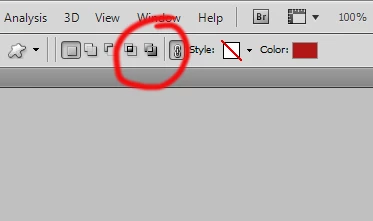
now you can draw the shape for the outer edge - this can go beyond the edge of your document. the center should now appear as a whole.
Already have an account? Login
Enter your E-mail address. We'll send you an e-mail with instructions to reset your password.
 AdChoices