
Known Participant
July 10, 2020
Question

Can I keep all EXIF metadata in batch converted images?

  • July 10, 2020
  • 3 replies
  • 7430 views

I am planning on converting all the HEIC photos from my iPhoneXS to JPG's using the batch conversion (Scripts > Image Processor) in Photoshop.  


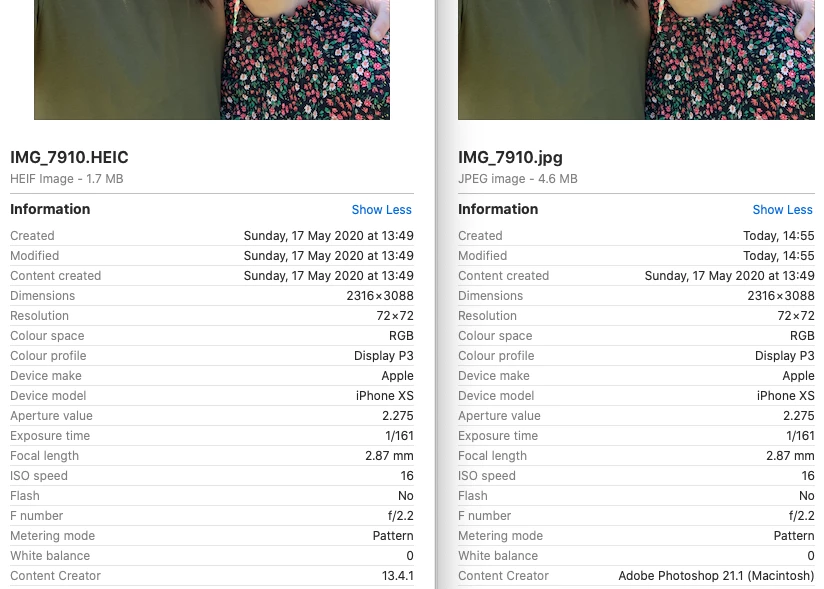
On a test run I see that the original HEIC photo's EXIF data (left hand side on my screen snap) states the Created, Modified and Content Created info as the date and time when the photo was taken but in converting it to JPG (right hand side of my screen snap) the Created and Modified data gets changed to today's (or the day I'm converting it) date and time, it's not the end of the world but I just want to check that once converted the EXIF data on the JPG will definitely keep the date and time the original photo was actually taken, and as much of the original EXIF data as possible?


I see that Content Creator (in my screen snap) has changed to Photoshop from the version of IOS on my iPhone so does anyone know what other data might get lost in the conversion process please?  


I also want to ask, as I know very little about HEIC files, if peeps think it's okay to just keep the HEIC files as is and not worry about converting them? I know the HEIC files are more compressed than JPG's, does that mean they have a reduced picture quality to a JPG and if they don't, will I be reducing quality by making them into JPG's?


The reason I ask this is because one of the ways I have seen to convert a HEIC image to JPG is to use Preview on a Mac, here the picture quality can be increased to make the HEIC file jump from 2.8MB to around 5 or 6MB, making it seem like the HEIC image quality can be increased and the file can be uncompressed? My imagination might be working overtime here! 


And one last thing, when batch converting in Photoshop does it keep the best quality of the photo whilst converting or does it apply any further compression? 
 

This topic has been closed for replies.

3 replies

Participant
May 17, 2023

I found this thread while trying to solve a similar problem. I wanted to batch-process HEIC images into jpgs, post the jpgs to an online gallery, and sort the gallery images by the create dates (Date Taken) of the iphone images. The Image Processor option in Photoshop did not retain Date Taken. I wanted to use the HEIC versions because that seems to be the only way to download full-resolution versions from icloud.

I found that putting the HEIC images into Lightroom and exporting them did retain that EXIF info.

Stephen Marsh
Community Expert
Community Expert
May 18, 2023
quote

I found that putting the HEIC images into Lightroom and exporting them did retain that EXIF info.


By @billk69148753


Thank you for sharing your experience. For those without Lr, I'm guessing that simply batch-processing the files inside ACR (not in Photoshop) would have similar results (untested).

Stephen Marsh
Community Expert
Community Expert
July 10, 2020

You will likely need to look into ExifTool or another robust metadata application to check to see what has been lost and to copy appropriate metadata from the .heic to the .jpg file if it is lost or altered.

Known Participant
July 13, 2020

Thanks. Can you recommend any robust metadata applications please where I can check the original HEIC file against the new converted JPG? 

JJMack
Community Expert
Community Expert
July 13, 2020

If you do not like the one you have use Photoshop. You can use any other application that can display the meta data from jpeg files and HEIC files there should be some differences.  If your Applet Phone Firmware created both files at the time you captured the image the meta data could be the same.  If not the Files have different creation times and may have different encoding  and different  software may have been use , as in this current case. Your Apple Phone create the HEIC files and Adobe Photoshop created the Jpeg file.

JJMack
JJMack
Community Expert
Community Expert
July 10, 2020

Is the Image Processor not creating new file that was create form opening a file HEIC format and save as Jpeg file using a lossey compression.  To me it look like the meta-data has the correct data. 


The jpeg file was created today and the image in the jpeg file is a different image it is not the image that was opened.  The Jpeg compression changed the image

JJMack
Known Participant
July 10, 2020

Apologies, I'm not sure I understand what you mean, can you elaborate please? Thanks

JJMack
Community Expert
Community Expert
July 10, 2020

The jpeg file was created today. 

The image in the the jpeg file was modified today.


That is the information I  see in the jpeg file meta data is good data


If the dates in there were the same as the dates in the HEIC file that would be bad data incorrect data.


The image quality will be different because of Jpeg encoding.  No  matter what Jpeg quality setting is used encoding the image. The jpeg file will not decode to the exact image the image was encoded from.  Also there may be some color issue for all I know.  I do not have a phone that takes pictures so do not process Phone pictures I would think they would be like Digital camera the images captured will be in some standard color space like sRGB  or Adobe RGB.  But I also know nothing about  HEIC file format and what it supports. If the Image processor uses a high Jpeg quality setting. The image quality should be as good as your Phones images quality

JJMack