
Participant
June 14, 2021
Answered

Can no longer save files as PDF or PNG

  • June 14, 2021
  • 1 reply
  • 996 views

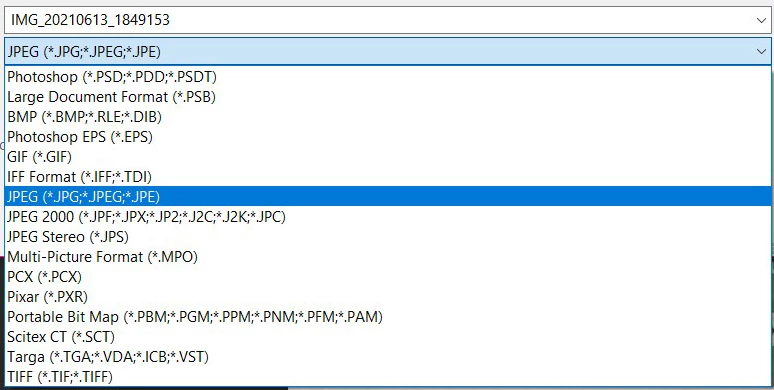
Where the heck are the PDF and PNG options? I haven't been able to poke around with Photoshop for at least a month, so I have no idea when this backwards 'update' came into effect and I can't find the answers I'm looking for.
 

This topic has been closed for replies.
Correct answer jane-e

Hi

As of 22.4.1, you can find them in Save a Copy.


As of 22.4.2 you can revert to the previous behavior in Preferences > File Handling > File Saving Options:

  • Enable Legacy Save As
  • Do not append Copy

See this help page for details and cautions:
https://helpx.adobe.com/photoshop/using/saving-images.html 

~ Jane


1 reply

jane-e
Community Expert
jane-eCommunity ExpertCorrect answer
Community Expert
June 14, 2021

Hi

As of 22.4.1, you can find them in Save a Copy.


As of 22.4.2 you can revert to the previous behavior in Preferences > File Handling > File Saving Options:

  • Enable Legacy Save As
  • Do not append Copy

See this help page for details and cautions:
https://helpx.adobe.com/photoshop/using/saving-images.html 

~ Jane


ama-rAuthor
Participant
June 26, 2021

I don't have this Enable Legacy Save As.


ama-rAuthor
Participant
June 26, 2021

Ah, I thought I had the updated version. Just checked the Cloud to see if there were any updates available and there was. It's fixed now - thank you so much!