Participant
September 17, 2018
Answered

can panels be on top and still docked?

  • September 17, 2018
  • 4 replies
  • 729 views

Like to have panels docked in photoshop but I also like to have the panel on top over open files. I've looked but can't find the option for this. Is it possible?

Cheers

Johnny

This topic has been closed for replies.
Correct answer Trevor.Dennis

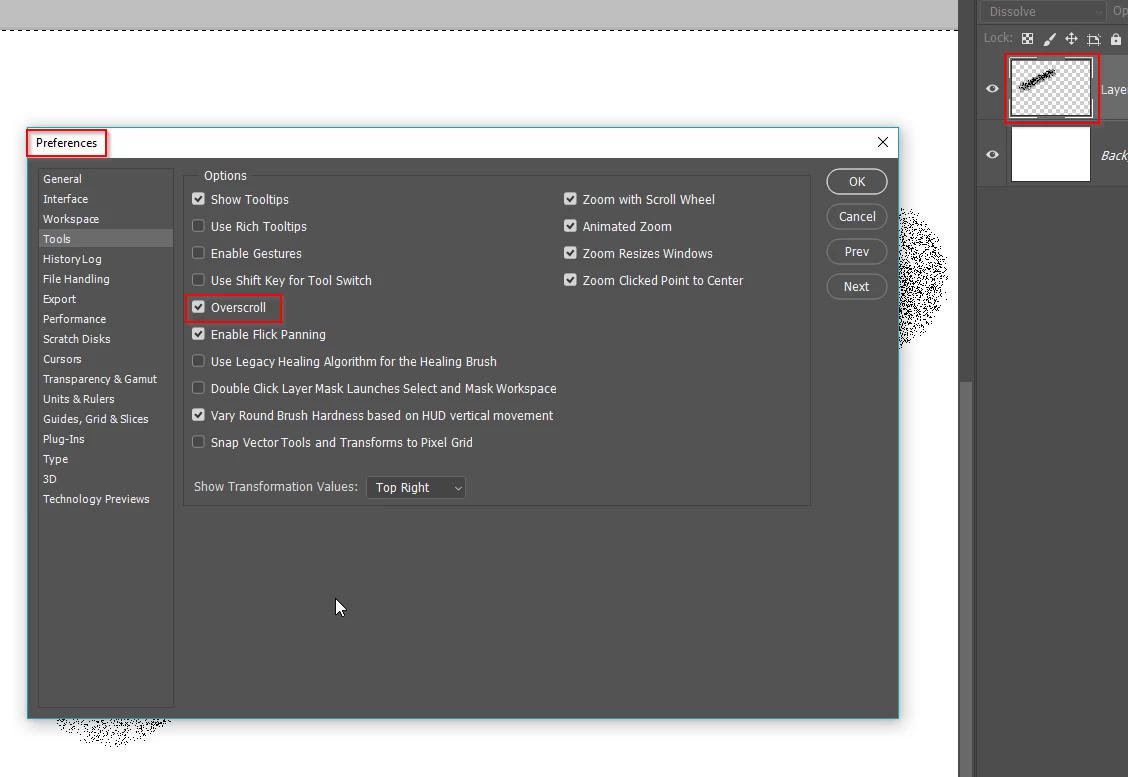
Is it as simple as Preferences > Tools > Overscroll?

You can see from the layer thumbnail that the image extends a long way beneath the panel.
4 replies

Trevor.Dennis
Community Expert
Trevor.DennisCommunity ExpertCorrect answer
Community Expert
September 18, 2018

Is it as simple as Preferences > Tools > Overscroll?

You can see from the layer thumbnail that the image extends a long way beneath the panel.

Bojan Živković11378569
Community Expert
Community Expert
September 17, 2018

If I can understand your question correctly then the answer is yes. Panel will be always visible.

Semaphoric
Community Expert
Community Expert
September 17, 2018

You can snap the panels to the upper and lower edges of the application frame title bar (also to the lower edge of the frame), but the snapping action is not very sticky, so they are easy to dislodge, and won't move along with the frame when it's moved.


Akash Sharma
Legend
September 17, 2018

Hi Johnny,

When a blue bar appears between the tool bar and the panel(s), and release the mouse button. If the panels do not dock, then the panels will float above the image. Is that what you're looking for? This would happen with the "application frame" under the "Windows" menu on a Mac and is defaulted on a Windows machine.

19blueoverlap

Thanks,

Akash

SkumhatAuthor
Participant
September 17, 2018

Thanks Akash, - yes, I have docked panels in place, but I also want the panels to be above the image. Is this possible? I work on a windows PC.

Mike_Gondek10189183
Community Expert
Community Expert
September 17, 2018

I do not use windows anymore, but would believe you can also do this as on Mac (just not the application frame)

Collapse panels

then you can show them, but only one at a time on top of your artwork