
Inspiring
January 4, 2018
Answered

Can screen mode be changed via action?

  • January 4, 2018
  • 3 replies
  • 793 views

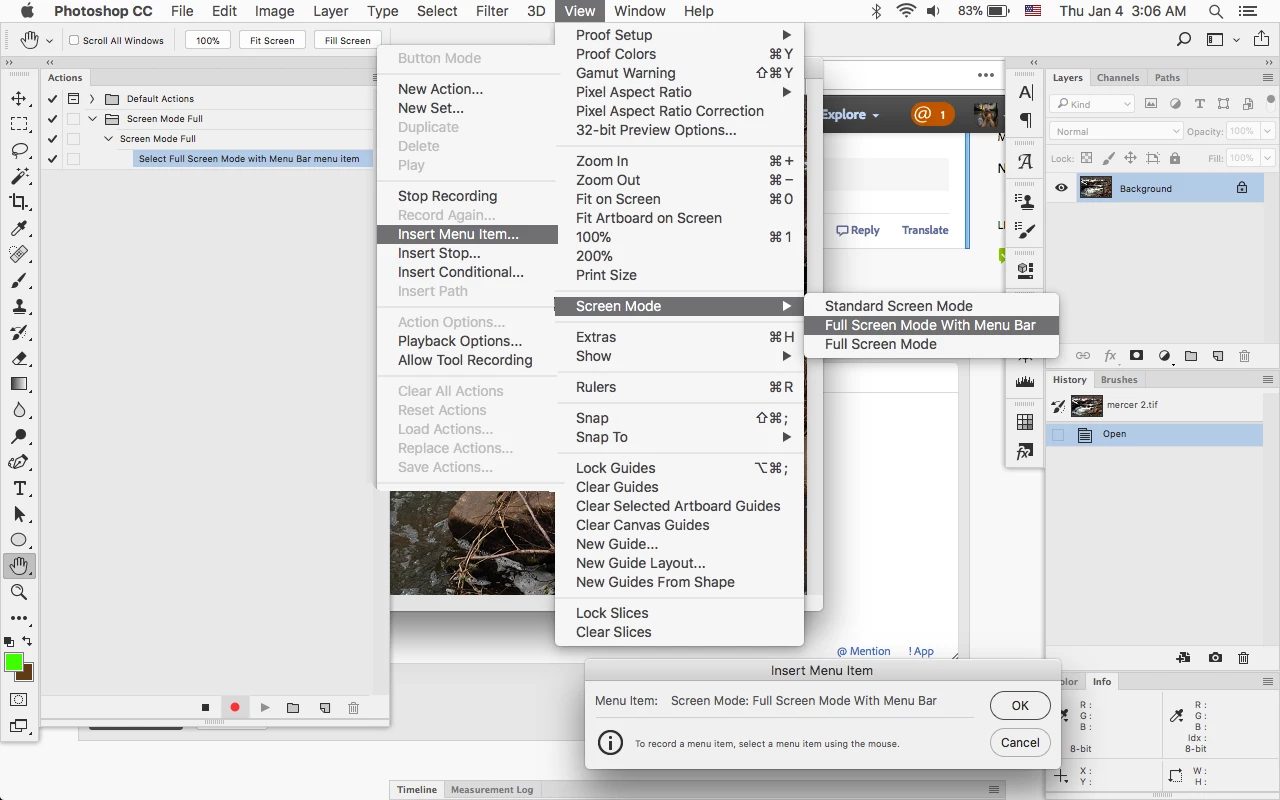
After getting the helpful suggestion on this thread, I tried to create an action to change screen mode, from "standard" to "full screen with menu bar." But when I record the action, going to View menu and changing screen mode, nothing gets recorded. (I have recorded actions without problems before).

Can screen mode not be recorded for an action?
This topic has been closed for replies.
Correct answer Jeff Arola

You can use Insert Menu Item and select View>Screen Mode>Full Screen Mode with Menu Bar

3 replies

jimtronAuthor
Inspiring
January 4, 2018

That worked, thanks!

Trevor.Dennis
Community Expert
Community Expert
January 4, 2018

Here's a thought.  You could trigger your action with the 'F' key.   Or am I missing something?

Stephen Marsh
Community Expert
Community Expert
January 4, 2018

Hi Trevor, I believe that the goal here is a ‘hands free workflow’, where the action is triggered by the Script Events Manager when an image is opened.

Jeff Arola
Community Expert
Jeff ArolaCommunity ExpertCorrect answer
Community Expert
January 4, 2018

You can use Insert Menu Item and select View>Screen Mode>Full Screen Mode with Menu Bar