
kirrwed
Inspiring
August 19, 2013
Answered

Can't create frames from layers CS6

  • August 19, 2013
  • 8 replies
  • 34962 views

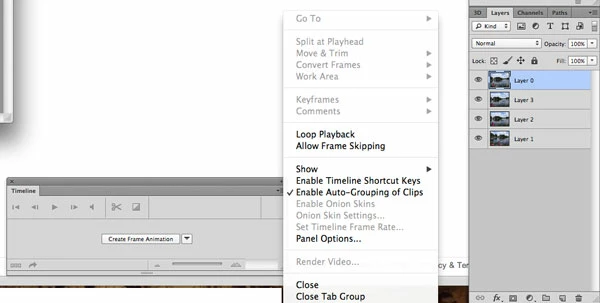
I have looked at multiple tutorials saying that to create an animated gif in Photoshop CS6, you just open the Timeline palette and select "Create Frames from Layers" from the dropdown. I don't see this option, not even grayed out. What is the problem?
    This topic has been closed for replies.
    Correct answer c.pfaffenbichler

    Have you clicked the »Create Frame Animation«-button yet?

    8 replies

    vlinchong
    Participating Frequently
    April 27, 2020

    I still don't get Create Frames From Layers. I've clicked that stupid Create Frame Animation button and unclicked it and closed out Photoshop and reopened and nada nothing zip. I've been trying to figure this out for an hour and I'm giving up and going to an outside source. Beyond frustrating. 

    Participating Frequently
    December 5, 2017

    Don't use Photoshop for making GIFs. It's the most stupid software for that purpose that ever existed. Bad UI, unintuitive, illogical, not doing what it says. Every once a year I need a GIF, and make a mistake to open Photoshop to do it, I end up wasting countless hours. Sometimes I get to the end result, sometimes not.

    Save your time, and use some Somalian or Burundi software, you'll be better off. Trust me, I've been developing software and websites for decades.

    Juan Galavis
    Participant
    April 28, 2017

    Why would you have a dropdown menu that prompts you to click a button BAD BAD BAD UX come on Adobe you can do better than that. For a week I've been thinking it had to be me (it's always the user fault) But this is borderline ridiculous!

    Participant
    October 31, 2017

    This is BEYOND ridiculous!  Photoshop has wasted 5 hours of my life today, on a very busy day when I needed to get a lot of work done.  First it was the ASININE "New" PS CC 2017, that apparently will NOT save Gifs at all, only the first frame, as a still picture.


    After that, I downloaded the oldest version available, PS6 (where is PS5?)


    I  then lost another three hours trying to figure out how to load frames to animate.


    IMO, the 'New" versions are clunky monstrosities that are completely non-intuitive, and do not help users to build upon the skills they've worked long and hard to acquire.  Yes, I would appreciate learning new skills and techniques, but ADD to the skillset - don't reararrange the alphabet!


    What was so difficult about leaving the 'Animations' window up top?  Or 'Save to Web' with a preview of the finished product?  (As CC 2017 lacks)


    Listen, I've done some AMAZING work on PS, I'm not a nincompoop, but these new changes are counter-intuitive, unnecessary, and again, ASININE!I work on a website for a MAJOR rock band, and have had only the best compliments from my superiors over the years.  With one sad stroke, your new programs have erased my capability to comprehend WTH I'm even doing.  And I daresay, that of much of your clientele.


    Why should one who's spent THOUSANDS of hours in PS have to hunt Google and forums in hopes of randomly finding an answer for the most basic operations in your program?  Are they military secrets?  To your own faithful paying customers?


    I'm seriously rethinking continuing my CC membership at this juncture. I don't have five hours to waste on busy days, and still feel I don't have all your new 'secrets' for unlocking functions that have been basic on every one of your previous versions of PS.


    And I'm betting, I'm not alone.

    Participant
    October 31, 2017

    Hope you'll take this in the spirit it's intended, but perhaps you'll consider launching a PS Rocket Scientists Edition for those who've nothing better to do than calculating mathematical probabilities, and perhaps engaging the services of COLUMBO to unravel the secrets of the most basic functions of PhotoWizardry.

    for my part, I cannot adequately express how disappointed and downright exasperated I am with PS6 and CC 2017 (Seriously, you can't save a GIF in CC 2017?  Please tell me you're kidding!)

    In the absence of a workable solution, I hope CC apps will make CS5 available once again.  And will take the frustrations of your many faithful users into account as you create PS 2018.  PLEASE give us a program that will WORK for our NEEDS.

    Otherwise, why even bother?

    adrianevk
    Participant
    November 3, 2016

    OMG...that's supposed to be a button?!  I have been working in Adobe products for almost 15 years...and I just had to look up tutorials on how to make an animated gif in the latest update?  Now that I know, I'm almost embarrassed.

    FedEx Frank
    Participant
    August 18, 2016

    Saved me from torture, button button button button it's a button. Never would have guessed.

    Participant
    April 26, 2016

    Seriously. This has to be the worst UX move by Photoshop ever. I have been attempting to place layers on my timeline for the past three hours and finally came upon this post. The box that says CREATE FRAME ANIMATION is a button? Come on Adobe. Make a button look like a button.

    c.pfaffenbichler
    Community Expert
    Community Expert
    April 27, 2016
    Come on Adobe.

    If you want to make a Feature Request or lend your support to an existing one check out

    Photoshop Family Customer Community

    kirrwed
    kirrwedAuthor
    Inspiring
    August 19, 2013

    Thanks - didn't realize it was even a button. Thought picking it from the dropdown was enough.  O_o

    Participant
    July 29, 2016

    GOD me too. so annoying.

    c.pfaffenbichler
    Community Expert
    Community Expert
    July 30, 2016

    Say what?

    c.pfaffenbichler
    Community Expert
    c.pfaffenbichlerCommunity ExpertCorrect answer
    Community Expert
    August 19, 2013

    Have you clicked the »Create Frame Animation«-button yet?

    Participant
    April 17, 2015

    thanks, me too. Doh!