
Gnossienne
Participant
March 22, 2017
Answered

Can't create layers

  • March 22, 2017
  • 1 reply
  • 22754 views

Hello!

In Photoshop CS6, I seem to be unable to create layers, effects, delete layers, etc. Just about everything on the bottom right corner bar. I am also unable to click below 3 layers, everything below is deactivated. Nothing is greyed out, it is all white. The buttons just wont press.

Anyone able to help? Thanks
This topic has been closed for replies.
Correct answer Brad Lawryk

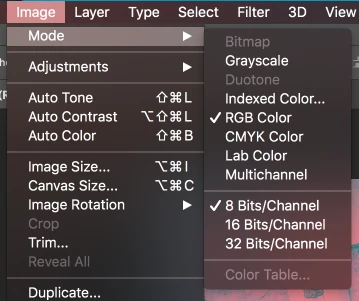
In your Image Mode Settings you likely have 'Multichannel' or 'Indexed Colour' selected?

1 reply

Brad Lawryk
Brad LawrykCorrect answer
Legend
March 22, 2017

In your Image Mode Settings you likely have 'Multichannel' or 'Indexed Colour' selected?

Gnossienne
Participant
March 23, 2017

Ah! That was it! Thanks, I have no idea how that happened LOL

Brad Lawryk
Legend
March 23, 2017

Haha, we all experience things in PS that we have no idea how that happened. It's like it likes to test you once in awhile to see if you are paying attention.

Glad you are back up and creating again! Good luck.