Participant
February 16, 2013
Answered

Can't enable 3d mode in Ps CS6

  • February 16, 2013
  • 8 replies
  • 55176 views

I'm new to photoshop and am trying to learn to use the 3D funcitonality but am not able to get 3D mode to even turned on.

Here's what I'm doing:

  1. new layer
  2. select text tool
  3. click on screen, type "Hello"
  4. highlight the text
  5. select 3D from the dropdown menu but only "Get more content" is available

What am I doing wrong here?

Thanks for your help!

I'm working using:

  • Photoshop Extended v13.1.2 x64

on a new iMac

  • Processor  3.2 GHz Intel Core i5
  • Memory  8 GB 1600 MHz DDR3
  • Graphics  NVIDIA GeForce GTX 675MX 1024 MB
  • Software  OS X 10.8.2 (12C2037)
This topic has been closed for replies.
Correct answer David Dobish

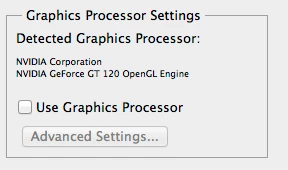
Sounds like the GPU is turned off. 

1. cmmd K to open Prefs

2. check "use graphics processor"

3. Quit PS

4. Relaunch  (Not necessary but probably advised)

5. Now try your steps.

if

the Pref is grayed out that means PS thinks something is wrong with your GPU.

Try Resetting preferences  cmmd+alt+shift after launch and then OK the delete prefs dialog.

Then see if the pref is still grayed out.

8 replies

Participant
March 25, 2020

None  I did all the possible solutions you gave but no one still works in my case...What can i further Do Please sir.

Participant
July 9, 2019

Make sure your image mode is RGB.

That did the trick for me.

Good luck.

winminh95986450
Participant
May 1, 2018

U should use first AI CS6 and then create a 3D design what u want to do, and make a save with PSD. U can get better one. GL

Participant
November 8, 2017

it is  importan to to remember the first step!!! 3D works in RGB!!!

suryadeepr72576173
Participant
October 24, 2017

How to do it in Windows 7?

Participant
October 5, 2017

Sorry if I am reviving an old post, but I am having this same issue too on mac.

Photoshop has detected my GPU and I can go into the Advanced settings, I don't think Photoshop thinks my GPU is stuffed, but all of my 3D options are still greyed out except for "Get more Content"

Does this mean my mac hasn't got enough to render 3D objects?

Here are my mac stats:

MacBook Air (13-inch, Early 2015)

Processor: 1.6 GHz Intel Core i5

Memory: 8 GB 1600 MHz DDR3

Graphics: Intel HD Graphics 6000 1536 MB

gener7
Community Expert
Community Expert
October 5, 2017

How does this setting look?

gener7
Community Expert
Community Expert
October 5, 2017

If that's normal, try resetting Preferences:

David DobishCorrect answer
Adobe Employee
February 20, 2013

Sounds like the GPU is turned off. 

1. cmmd K to open Prefs

2. check "use graphics processor"

3. Quit PS

4. Relaunch  (Not necessary but probably advised)

5. Now try your steps.

if

the Pref is grayed out that means PS thinks something is wrong with your GPU.

Try Resetting preferences  cmmd+alt+shift after launch and then OK the delete prefs dialog.

Then see if the pref is still grayed out.

jacobespaAuthor
Participant
February 20, 2013

David,

Thank You!

This worked, albiet my Graphics Processor Setting we infact set to "use graphics processor". I ended up resetting my preferences like you suggested (the "cancel" button in the Graphics Processor Settings window flashed to "reset" when I clicked cmmd+alt+shift).

I'm good to go now, thank you very much!

BenjaminMarkus
Inspiring
February 16, 2013

Are you highlighting the text in the Layers panel or highlighting the text itself?  If the text is highlighted or selected in the Layers panel then you should be able to click on the 3D menu and select New 3D Extrusion From Selected Layer:

Here's a great tutorial for using 3D with Photoshop CS6 Extended.  It goes through all the basics so it should definitely help you out:

jacobespaAuthor
Participant
February 18, 2013

Ben,

Thank you very much for the feedback. Unfortunately, I am still have problems: I've tried highlighting the text and have also tried selecting the text layer in the Layers panel before attempting to click on the 3D menu - in both cases I am not able to select New 3D Extrusion From Seleected Layer:

Let me know if you have any other ideas on what I may be doing wrong here, thanks!

BenjaminMarkus
Inspiring
February 20, 2013

Since questions concerning Photoshop 3D often become overly advanced for the Photoshop for Beginners Forum, I'm moving your post to the Photoshop General Discussion forum where your question will receive more specialized attention.