tertiarysecondary
Participant
May 20, 2017
Answered

Can't find the "create frame animation" button?

  • May 20, 2017
  • 2 replies
  • 5944 views

I've recently downloaded Photoshop cc and attempted to create animations by following tutorials online. But, I find that i do not have the "create frame animation" or the "create video timeline" buttons when i select "timeline" from the window tab. I'm not sure if this problem is related but whenever i try to animate, the same picture shows up in each frame and it doesn't "animate". (on a mac) Please help!

    This topic has been closed for replies.
    Correct answer JJMack

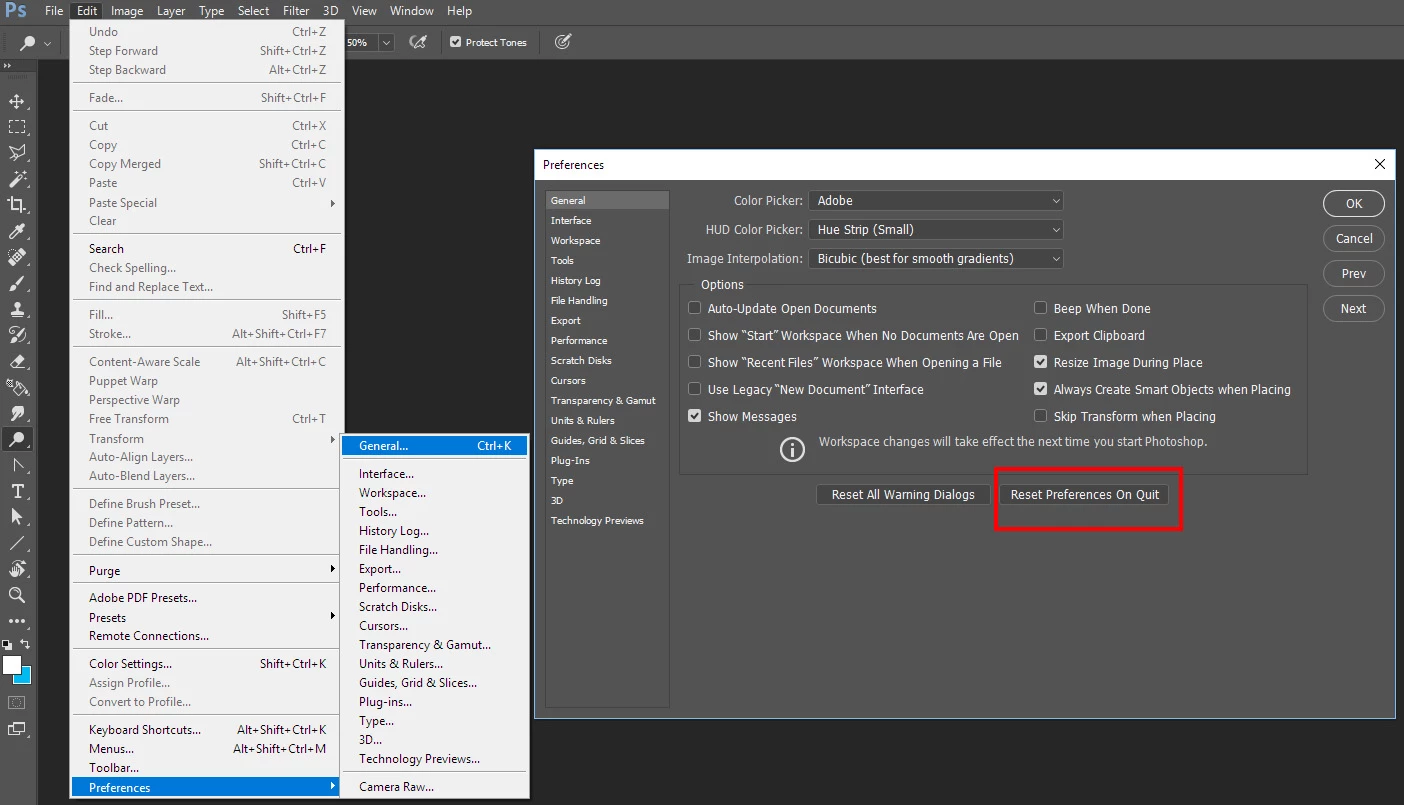
    When you start Photoshop Press and hold Ctrl+Alt+Shift immideatle befir to see the Photoshop Flash screen  Photoshop should open a dialog asking if you want to delete your preferences reply Yes.  If you can't do that,  if you can start Photoshop  you can use the reset preference button on quit in Photoshop general Preferences when you quit Photoshop tot preferences will be reset

    2 replies

    scottprobst
    Participating Frequently
    February 14, 2021

    Hi -


    I've tried these solutions and they have no effect. I've previously had not trouble creating GIFs prior to upgarading.


    I'm using PS 22.2.0 on a MacBook Pro running 11.2.1 big Sur.

    JJMack
    Community Expert
    Community Expert
    May 20, 2017

    Try resetting your Photoshop Preferences. It sort of look like you created a frame animation however to palette is not correctly layout. You also have to have a document open in Photoshop to create a frame animation.

    JJMack
    tertiarysecondary
    Participant
    May 21, 2017

    how do i reset my photoshop preferences?

    JJMack
    Community Expert
    JJMackCommunity ExpertCorrect answer
    Community Expert
    May 21, 2017

    When you start Photoshop Press and hold Ctrl+Alt+Shift immideatle befir to see the Photoshop Flash screen  Photoshop should open a dialog asking if you want to delete your preferences reply Yes.  If you can't do that,  if you can start Photoshop  you can use the reset preference button on quit in Photoshop general Preferences when you quit Photoshop tot preferences will be reset

    JJMack