pjscott51
Participating Frequently
July 6, 2022
Answered

Can't find the Photoshop plug-in for Canon Print Studio Pro

  • July 6, 2022
  • 1 reply
  • 756 views

Hi, I'm using Windows 11 and Photoshop 23.4.1 release.

I use Photoshop to print using Canon Print Studio Pro.

Today I tried to print something and the Canon Print Studio Pro plug-in wasn't there.

This has happed before so I have instructions to reinstall the plug-in. When I navigate to 

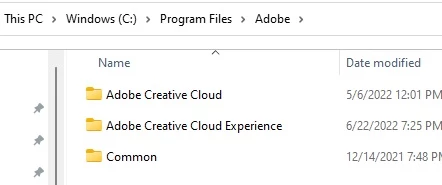
Program Files\Adobe\Adobe Photoshop CC\Plug-in there wasn't a plug-in folder. Below is an image of what I see. What can I do to fix this problem?

Thanks,

Paul


This topic has been closed for replies.
Correct answer Brad @ Roaring Mouse

If you've updated to a new full-point version of Photoshop (e.g. from 22.x to 23.x), your previously installed Canon plugin will be in the Plugin folder for the older version; your new install doesn't carry that over. The best approcah is to reinstall the Canon plugin from its original installer (making sure you have the latest version and that it's compatible with 23.x and/or Win11)

1 reply

Brad @ Roaring Mouse
Community Expert
Brad @ Roaring MouseCommunity ExpertCorrect answer
Community Expert
July 6, 2022

If you've updated to a new full-point version of Photoshop (e.g. from 22.x to 23.x), your previously installed Canon plugin will be in the Plugin folder for the older version; your new install doesn't carry that over. The best approcah is to reinstall the Canon plugin from its original installer (making sure you have the latest version and that it's compatible with 23.x and/or Win11)

pjscott51
pjscott51Author
Participating Frequently
July 6, 2022

Thanks Brad for the help. I found the plug-in and everything is working fine.

I appreciate your help. Have a great day,

Paul