Inspiring
August 4, 2017
Answered

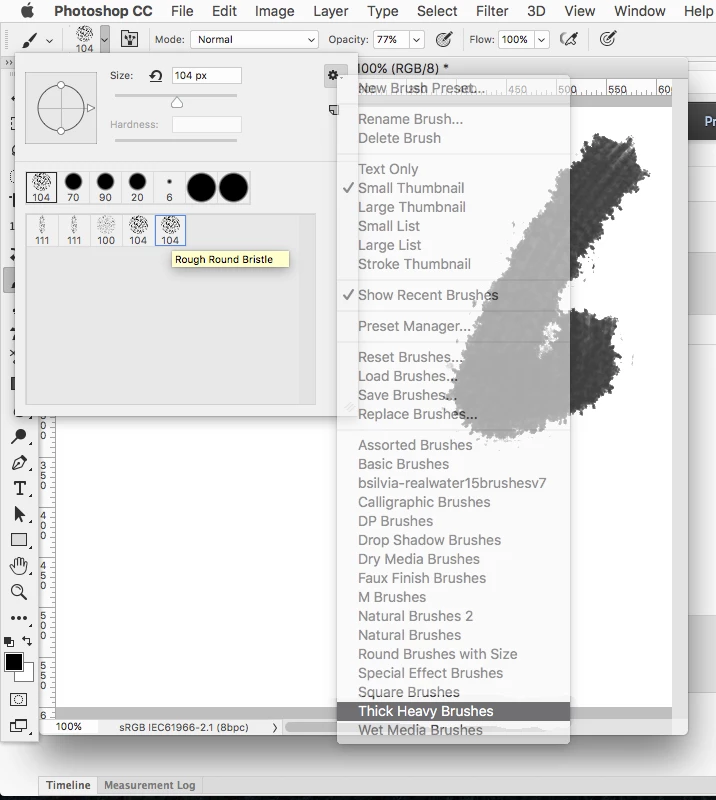
Can't find the rough round Bristle brush In Photoshop CC 2017

  • August 4, 2017
  • 2 replies
  • 11094 views

I see it was included in the latest release but I can't find it in the Brush panel under Brush and or Brush Presets.  Is it an adobe download?

Thanks for any and all help!!!

Garry W
    This topic has been closed for replies.
    Correct answer Jeff Arola

    It's under Thick Heavy Brushes

    2 replies

    Trevor.Dennis
    Community Expert
    Community Expert
    August 4, 2017

    Could it be a tool preset?  If you select the brush tool and open the Tool Presets panel, you might see it there.  I have clicked to activate pressure affects opacity in the example below

    If I am off track, can you link to where you learned about this brush?

    garry101Author
    Inspiring
    August 4, 2017

    I don't see it under the presets - but R Kelly led me to Thick Heavy Brushes so I loaded that up (append) and there it was!!!!  Thanks for responding!!!

    Jeff Arola
    Community Expert
    Jeff ArolaCommunity ExpertCorrect answer
    Community Expert
    August 4, 2017

    It's under Thick Heavy Brushes

    garry101Author
    Inspiring
    August 4, 2017

    Thanks So Much!!!!  lifesaver!!!