
Inspiring
February 5, 2024
Answered

Can't group layers in Photoshop

  • February 5, 2024
  • 2 replies
  • 2283 views

Sometimes when I'm working on a document in Photoshop, the application refuses my group layers.  I'm attaching a video screenshot.  


I make very many layers in all of my files, and I make nesting groups of them, but only maybe once per month do I end up with a file which Photoshop won't let me group a certain layer or folder.  


Why does this happen, and can it be worked around? 
This topic has been closed for replies.
Correct answer jeremyp1470049

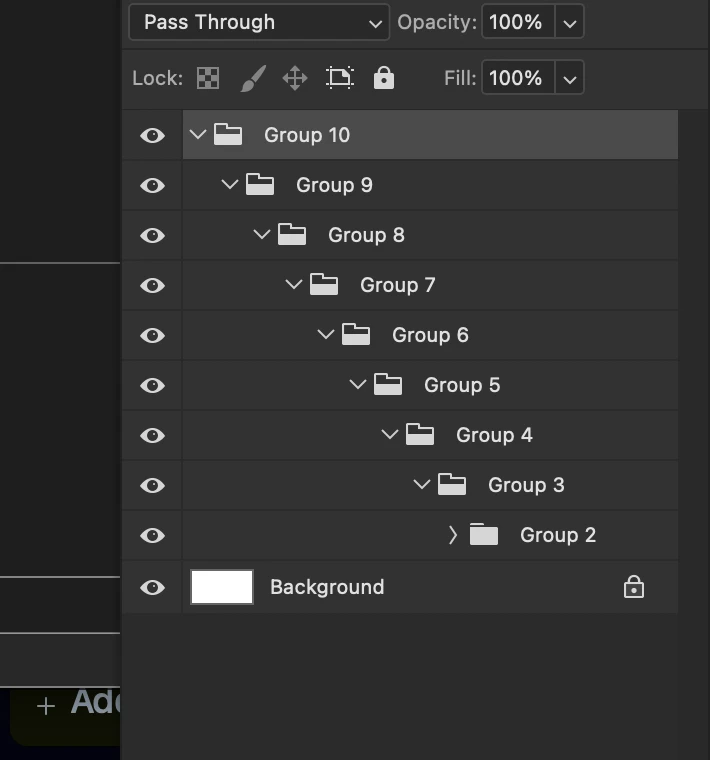
PS has a limit (I believe) of 5 layers deep. If you have a lot of nested folders, this could be hitting a limit.


Thank you for your insight. I just tested the idea on a new document, and found that I can go 10 nested folders deep, but no more than that.  Now I have my answer


2 replies

Kevin Stohlmeyer
Community Expert
Community Expert
February 5, 2024

@jeremyp1470049 whats inside the existing group? As soon as you clicked that with another layer - the option turned off. There must be something either locked or unable to be grouped in another folder structure.

Inspiring
February 5, 2024

Well there are many layers and folders in the existing group - but none are locked.  What other reasons could make it unable to group? 

Kevin Stohlmeyer
Community Expert
Community Expert
February 5, 2024

PS has a limit (I believe) of 5 layers deep. If you have a lot of nested folders, this could be hitting a limit.

Ares Hovhannesyan
Community Expert
Community Expert
February 5, 2024

What kind of Layers are your layers?  

Inspiring
February 5, 2024

Bitmap layers and smart layers are in this group.  Many have layer masks.