Participant
January 24, 2019
Answered

Can't load any tools in Photoshop CC 2019

  • January 24, 2019
  • 2 replies
  • 3757 views

Hi, I'm missing my legacy brushes in my Photoshop. Things I've tried:

  • Finder> PS CC 2019> Presets> Brushes> Legacy Brushes.abr (Drag and drop into PS. Result: "Could not place “Legacy Brushes.abr” because no parser or file format can open the file."

  • Drop Down beside the brush icon on top left> Settings> Load Tool Presets> The "Legacy Brushes.abr" file doesn't show up, and neither does any other file inside the 'brushes' folder.

  • Re-Installed PS.

Any help?

This topic has been closed for replies.
Correct answer Bojan Živković11378569

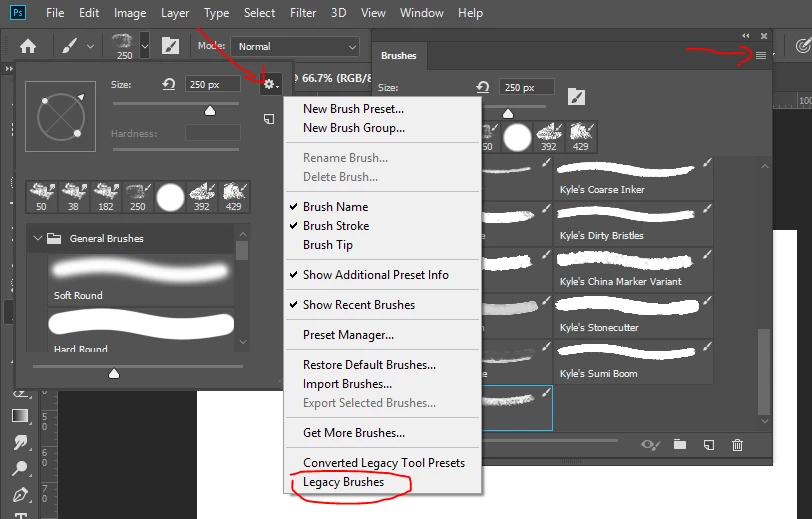
Do you see Legacy Brushes option when you click on Brushes panel menu (right side on screenshot) or when clicking on gear icon with Brush Preset picker expanded (left side on screenshot).

2 replies

Bojan Živković11378569
Community Expert
Community Expert
January 24, 2019

Do you see Legacy Brushes option when you click on Brushes panel menu (right side on screenshot) or when clicking on gear icon with Brush Preset picker expanded (left side on screenshot).

JJMack
Community Expert
Community Expert
January 24, 2019

Tool presets have .tpl extension  .abr files are Adobe Photoshop Brush files.

JJMack