
Participating Frequently
November 13, 2020
Answered

Can't Nudge Vector Points

  • November 13, 2020
  • 3 replies
  • 676 views

When I select points in a vector using the Direct Selection tool, I can no longer nudge the selected points with the arrow keys. It moves the WHOLE vector, not just the selected points.


Another item on the "How the garbage did Adobe break this in a major release!?" pile.
This topic has been closed for replies.
Correct answer War Unicorn

?

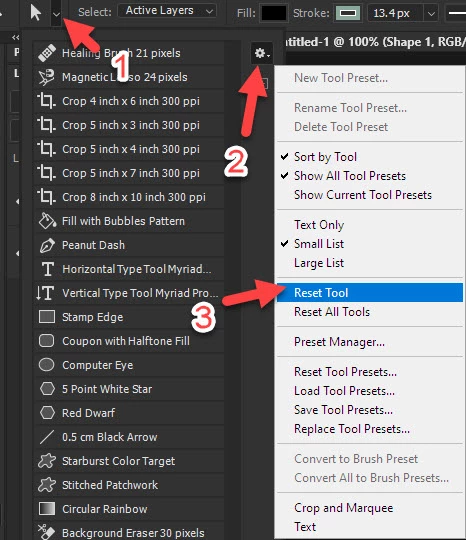
Working fine here. Did you try resetting the tool?

3 replies

Conrad_C
Community Expert
Community Expert
November 13, 2020

If it happens again, or if the reset fix does not work for some...there is a logged bug about this type of behavior that Adobe is investigating:


Photoshop: Edit Live shapes problems at the official Photoshop Feedback site:

If I have a rectangle Live Shape with round corners and use the direct selection tool to select the anchors point to one size only, when I move them using the shift key, the entire rectangle is moved, instead of only the side I had selected. Same issue, if I use the arrows keys on computer to fine-tune the positions of it.
War Unicorn
Community Expert
War UnicornCommunity ExpertCorrect answer
Community Expert
November 13, 2020

?

Working fine here. Did you try resetting the tool?

Participating Frequently
November 13, 2020

The reset did the trick, thanks. No idea why that would've been necessary though, since I have not changed or added any presets at all, ever. Seems to me more likely an Adobe bug from the upgrade installation. Oh well. I'm going significantly less crazy now, so thanks again for the pointer.

Participating Frequently
November 13, 2020

Also can't click and drag selected vector points, either. Ridiculous.