Participant
April 2, 2023
Answered

Can´t open a picture in Photoshop

  • April 2, 2023
  • 4 replies
  • 462 views

Since a couple of days it´s not possible for me to open any picture in Photoshop. 

When I try, the whole picture area in Photoshop starts flashing white. 

Dive routines for grafic cards are updated and program reinstalled, without any result. 

- Adobe Photoshop-version: 24.3.0 20230316.r.376 37b4b38 x64
- Windows 11 64 bitar 

Please see also attached file: GrafikProcessor.png 
This topic has been closed for replies.
Correct answer Ged_Traynor

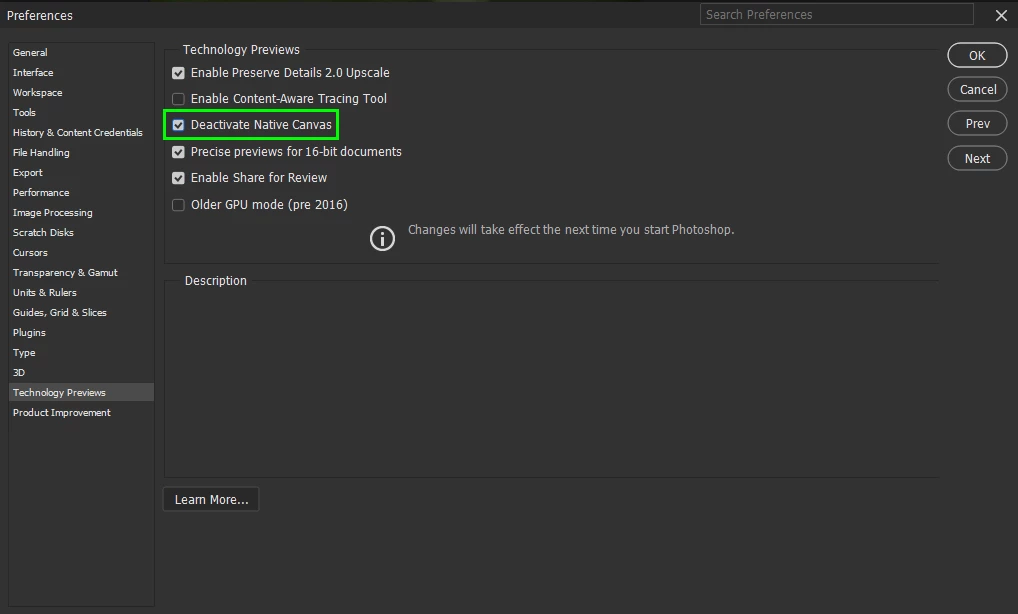
@413Jax go to Edit > Preferences > Technology Previews and enable this option, then restart Photoshop

4 replies

413JaxAuthor
Participant
April 3, 2023

Thank You all very much for Your kind help! 

I am now back in operation - Many Thanks! 

Leif

c.pfaffenbichler
Community Expert
Community Expert
April 3, 2023

Please remember to mark a correct answer as such. 

Participant
April 3, 2023

To enable this option, please navigate to Edit followed by Preferences, and then Technology Previews. Once you have found the option, enable it, and then restart Photoshop for the changes to take effect.

Ged_Traynor
Community Expert
Ged_TraynorCommunity ExpertCorrect answer
Community Expert
April 3, 2023

@413Jax go to Edit > Preferences > Technology Previews and enable this option, then restart Photoshop