
Zapdexio
Inspiring
November 18, 2018
Question

Can't open PhotoShop because of preferences

  • November 18, 2018
  • 2 replies
  • 340 views

Hi! So I was using PhotoShop as I always do, then relaunched it to check something.

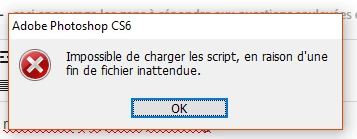
But this time it was showing two error messages, first this one:
And then this one:
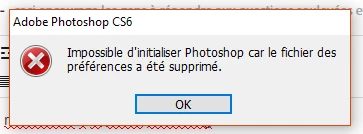
It seems like it comes from the preferences file...

I tried the CTRL + Shift + ALT method, and it didn't show me the "Reset preferences" thing, but I didn't stop myself here.

I then tried to create an empty preferences file, and when PhotoShop was starting it deleted the file!

How can I fix that without reinstalling it? ;-;

This topic has been closed for replies.

2 replies

Chuck Uebele
Community Expert
Community Expert
November 18, 2018

Have you tried reinstalling Photoshop?

rob day
Community Expert
Community Expert
November 18, 2018

It looks like you have a startup script installed that is failing?

Bridge has a startup scripts preference that can load Photoshop startup scripts. Try opening Bridge>Preferences>Startup Scripts and see if there are any Photoshop scripts that are checked but you don't use.

Zapdexio
ZapdexioAuthor
Inspiring
November 18, 2018

Everything is checked and it shows the same error...

I don't remember installing anything, and the preferences just deleted themselves apparently '-'

rob day
Community Expert
Community Expert
November 18, 2018

Everything is checked and it shows the same error...

Right, but if there is a script interfering with the startup you would want to try unchecking everything.

Can you show a capture of the Bridge prefs?