Participant
June 27, 2018
Beantwortet

Can't paint over previous strokes

  • June 27, 2018
  • 1 Antwort
  • 1872 Ansichten

This morning i realized that when i would attempt to paint in Photoshop that I can't place brush strokes on top of each other. If I put down black then tried to come in with grey it wouldn't appear on top but instead underneath. I honestly don't have the slightest idea as to what I should do.
Dieses Thema wurde für Antworten geschlossen.
Beste Antwort von gener7

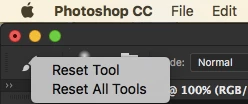
Reset the Brush Tool by right-clicking on the Brush icon, and let me know if that works.

Check the Layers Panel, make sure Blending Mode is Normal, Opacity and Fill both 100%

1 Antwort

gener7
Community Expert
gener7Community ExpertAntwort
Community Expert
June 27, 2018

Reset the Brush Tool by right-clicking on the Brush icon, and let me know if that works.

Check the Layers Panel, make sure Blending Mode is Normal, Opacity and Fill both 100%

PonggoAutor
Participant
June 27, 2018

Thank you so much, it worked perfectly.

gener7
Community Expert
Community Expert
June 27, 2018

You're welcome. I find "Reset Tool" to be the perfect answer when you have forgotten what you adjusted. It reverts all tools to stock defaults.

Gene