


May 29, 2012
Question

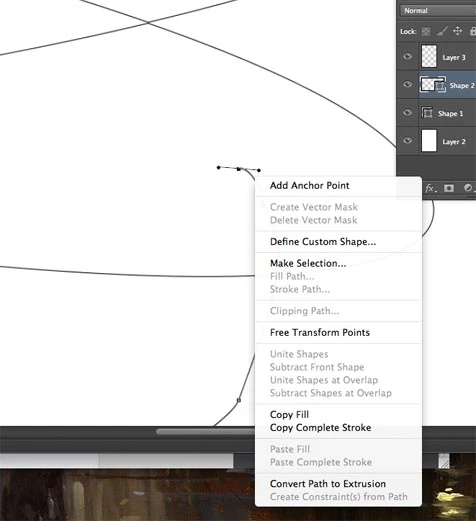
can't select 'stroke path' in photoshop CS6 to taper pen tool edges

  • May 29, 2012
  • 6 replies
  • 168631 views

For some reason I can't select the "stroke path" option with the pen tool in photoshop to add tapers to my pen tool strokes. I can only get dead lines. why is this not working?
This topic has been closed for replies.

6 replies

zeeshanh6634224
Participant
December 1, 2016

i have option of stroke path but when i click its still not working .....................what should i do?

Participant
March 21, 2014

If I understand you correctly JimFro, you want to draw a path with the pen tool then apply a stroke that tapers to nothing using the path as your guide.

To do this in CS6:

First draw out your path, making sure to draw in the direction you want the line to fade to.

Then you need to create a new layer onto which your stroke will be drawn. Make sure you have it selected.

Next you need to set up your brush. Select the brush you wish to use (size, colour etc.) - then open the brush panel and under 'shape dynamics' select fade in the control for size jitter. then enter in pixels the distance you want to fade the stroke in. You'll probably have to trial & error this figure.

Finally in the path panel select the 'stroke path with brush' icon (second from left at the bottom of the panel) to apply the faded stroke to the selected layer.

June 25, 2013

I've just figured out while trying to stroke on a layer using ellipse shape.

Just select the shape with path selection tool and press ctrl+x then ctrl+v (just cut and paste it anywhere). Now the stroke options must be available.

Cheers

Participant
June 17, 2021

Yaaaass! Thank you!!


Participant
November 10, 2012

When you use the pen tool, make sure path is selected in the top right corner. You have it selected to shape not path

NandaPoP
Participant
December 15, 2016

Thanks you jeng801!!

I resolve the problem thank you answer... but now.. I have another one......

When I try to apply my brush appear another one like picture below..

Thanks

Re: can't select 'stroke path' in photoshop CS6 to taper pen tool edges
Participant
October 15, 2012

If its smart object, it wont work.

Jeff Arola
Community Expert
Community Expert
May 30, 2012

In your screenshot you have a shape layer selected. In order to stroke paths you need to either save the path if it's a shape layer and make a new blank layer to add the stroke

or make your path using the paths option instead of shapes and use a non shape layer, smart object, adjustment layer to put the stroke on. In other words the active layer needs to be a pixel layer (such as layer 3 in your screenshot) in order to stroke a path with one of the brush tools.

Participant
July 19, 2016

Thanks a lot! That really helped.