
Participant
August 26, 2018
Answered

Can't switch to Pencil tool in Photoshop CC 2018

  • August 26, 2018
  • 2 replies
  • 889 views

I have selected the Pencil tool but the only options I can get are for the Brush tool. I'e looked at the Help and there was an answer in Feb 2017 but that doesn't seem to apply to 2018.The options window looks completely different. I have tried clicking on all icons that look like a brush tool hoping to get it to change to a pencil tool but no luck. The only options are for soft round brushes. I would add screen captures. I've tried png, gif, and jpg and get "That image type is not allowed." what image type is allowed?
This topic has been closed for replies.
Correct answer davescm

Hi

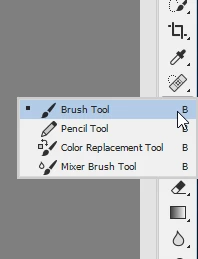
Click and hold down the brush tool icon and you should see a menu with teh pencil tool in it.

If you don't see it, go to menu Edit >Toolbar and click "Restore Defaults"

Dave

2 replies

davescm
Community Expert
Community Expert
August 26, 2018

Oh and as for the forum rejecting images, there is an issue with the forum at present. Jpegs and GiFs are both fine, unfortunately some are being rejected wrongly.

Dave

davescm
Community Expert
davescmCommunity ExpertCorrect answer
Community Expert
August 26, 2018

Hi

Click and hold down the brush tool icon and you should see a menu with teh pencil tool in it.

If you don't see it, go to menu Edit >Toolbar and click "Restore Defaults"

Dave