madoneee
Participant
June 4, 2019
Question

Can't understand what to do

  • June 4, 2019
  • 5 replies
  • 453 views

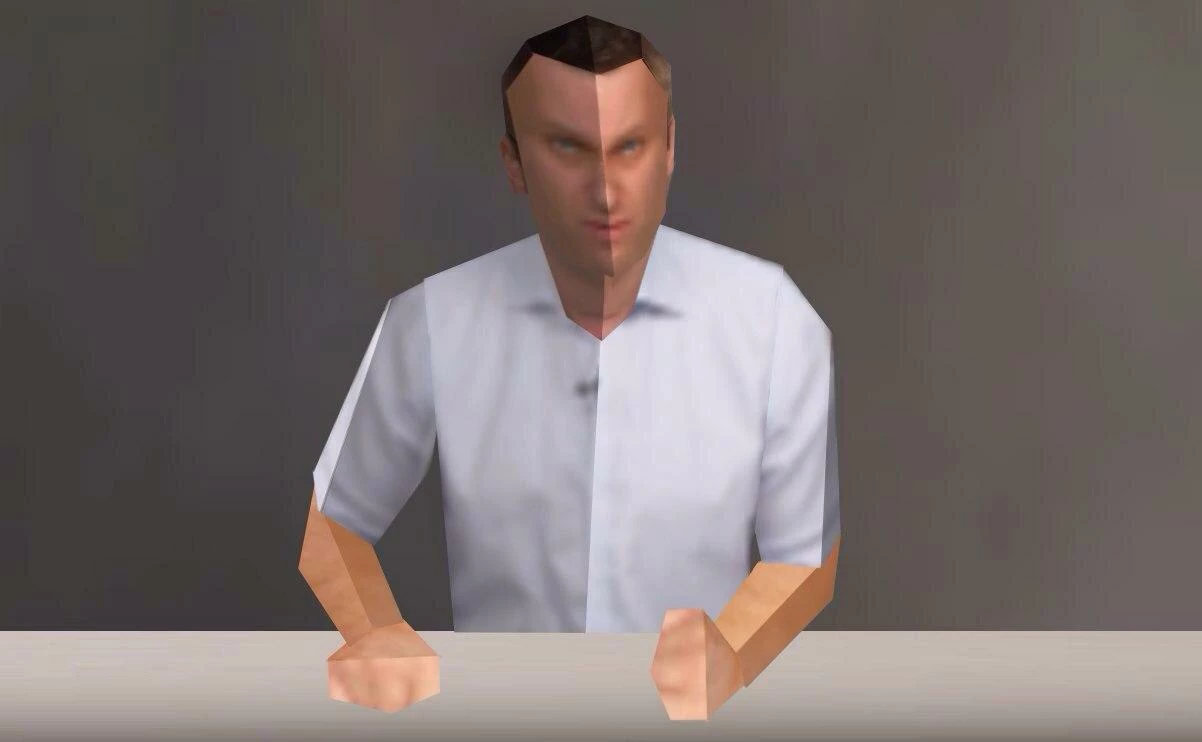
Hello everyone, I want to make my own photo like it's shown on a picture. I'm disappointed with it because I just can't understand which tools would help me
    This topic has been closed for replies.

    5 replies

    Trevor.Dennis
    Community Expert
    Community Expert
    June 5, 2019

    Blimey Ged.  I tried watching the Low Poly video, but it was too painful.  I was published late 2017 but is already out of date with the repeat filter shortcut being stolen for the new Search function.  Not that I am complaining, because I love that search tool, but we have to add Alt to Ctrl F now.

    In actual fact, my workspace turned to custard when I tried it just now, because I use the Michael Ninness  window arrangement shortcuts, and with seven open documents suddenly floated, it was like a digital bomb blast.  I have F7 set to switch to and reset Essentials, so hitting that first put me straight.

    But I was still hoping for something clever to redeem Photoshop after the Illustrator does it better comments.  I think the old app is up against the ropes, and about to go down for a full count on this one. 

    Barb Binder
    Community Expert
    Community Expert
    June 5, 2019

    My morning LOL: "my workspace turned to custard".

    ~Barb

    ~Barb at Rocky Mountain Training
    Trevor.Dennis
    Community Expert
    Community Expert
    June 5, 2019

    I am fairly sure I have seen a tutorial on this, when each facet was created manually.

    So you need to draw each segment with the pen or lasso tool, and use something like Blur > Average

    The trick would be to select an area of similar tonal (brightness) value so that the facets are delineated.

    For shapes like the eye, perhaps use the Polygon tool (set to five sides below)

    To make a path into a selection, Ctrl click the path.

    Stephen Marsh
    Community Expert
    Community Expert
    June 4, 2019

    A crude 3D model with image/texture mapping, lighting etc?

    Norman Sanders
    Legend
    June 4, 2019

    This seems to have been done in Illustrator building on a Trace foundation, then moved to Photoshop to handle the shading and face; features.

    Community Expert
    June 5, 2019

    I agree with Norman.sanders, some tracing feature capable tool like Illustrator has been used. Obviously It can be created manually, thanks Trevor.Dennis!

    Chuck Uebele
    Community Expert
    Community Expert
    June 4, 2019

    This looks like the image is broken into sections using either layer mask or separate layers. My example I used the polygon lasso tool to make selections of the main image. Then used ctrl/cmd-j to put them on their own layer. Then I locked the transparency of the layer, so it would not bleed when I applied gaussian blur.

    madoneee
    madoneeeAuthor
    Participant
    June 4, 2019

    If it is not hard for you, can you please show me this method on a person? Here is example: