Question
Can't use 3d Options
Hello all!
Sorry if this has been posted... I'm not the best with tech specs and really don't understand where people are getting all of the program information they are posting; otherwise I would also post my program specs 😕😕
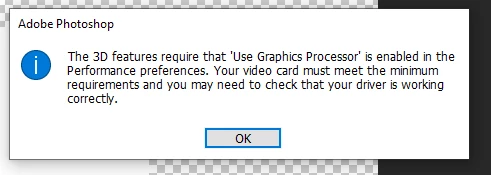
I keep getting a pop-up when I try and use the 3D features in Photoshop 2020 (See attached screenshot). However, "Use Graphics Processor" is enabled.
I have just purchased this computer, it's not even a month old and should easilly meet the specs for this; Adobe itself totes this machine as a workstudio for their programs.
I'm really not sure where to look or how to go about troubleshooting this; can anyone help me?
[added image ussnorway]
 AdChoices