
Participant
July 8, 2024
Answered

can't use "Create a montage from ordered image tiles" script (error 8: syntax error)

  • July 8, 2024
  • 3 replies
  • 287 views

hey all. hope everyone is having a nice day/night! i have absolutely no coding experience, but i am trying to use this photoshop script to "take an ordered folder of image tiles and creates one big montage" of them. i made a .jsx file with all the code in the link but get this error when running it:
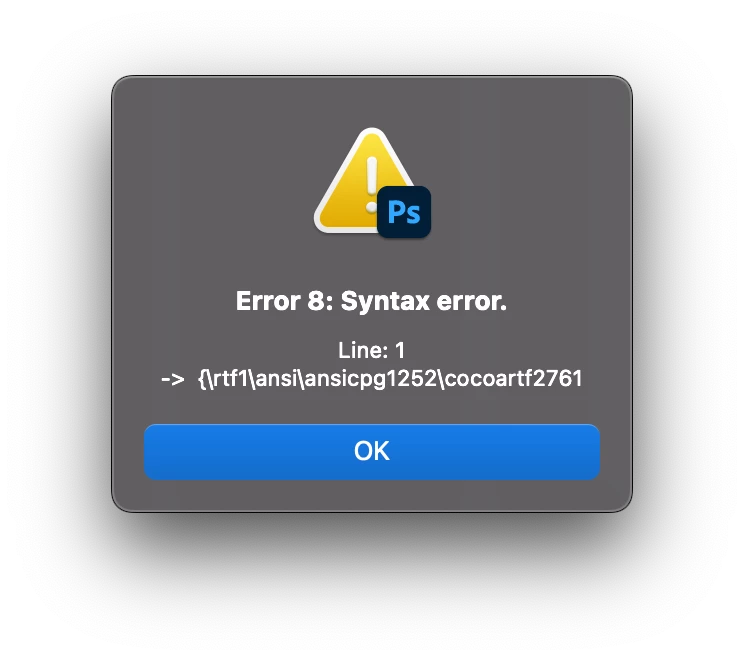


i think its because i didn't put the photos i want to create one big montage out of anywhere in the photoshop, but idek how or where to do that. any help would be much appreciated. thank you very much.

This topic has been closed for replies.
Correct answer Stephen Marsh

@Jeff36693439p7jx 


You have saved the plain text code as a Rich Text File and not as Plain Text. This is a common mistake for Mac users as unlike Windows, the Mac has a single program that handles both types via a menu option:


"Mac: Apple TextEdit (ensure that the Format menu is set to Plain Text mode, not Rich Text mode)"


https://prepression.blogspot.com/2017/11/downloading-and-installing-adobe-scripts.html


3 replies

Stephen Marsh
Community Expert
Community Expert
July 8, 2024

@Jeff36693439p7jx – You’re welcome!

Participant
July 8, 2024

ty so so much, that fixed it!

Stephen Marsh
Community Expert
Stephen MarshCommunity ExpertCorrect answer
Community Expert
July 8, 2024

@Jeff36693439p7jx 


You have saved the plain text code as a Rich Text File and not as Plain Text. This is a common mistake for Mac users as unlike Windows, the Mac has a single program that handles both types via a menu option:


"Mac: Apple TextEdit (ensure that the Format menu is set to Plain Text mode, not Rich Text mode)"


https://prepression.blogspot.com/2017/11/downloading-and-installing-adobe-scripts.html