Participant
August 15, 2025
Answered

Can the impossible be done? Colour change

  • August 15, 2025
  • 2 replies
  • 628 views

Hi everyone,

I’m looking for a working Photoshop script for macOS that can do the following:

  • Open a folder containing multiple image files.
  • Replace all instances of a specific color with a new color (for example, replace #2b4961 with #1983c0).
  • Save the edited files to a new folder without overwriting the originals.


I’m hoping to automate this process for a batch of images, and I’m not sure how to handle the color replacement part in Photoshop scripting.

Any guidance, sample scripts, or tips would be greatly appreciated!

Thank you!

Correct answer D Fosse

Something amiss indeed.


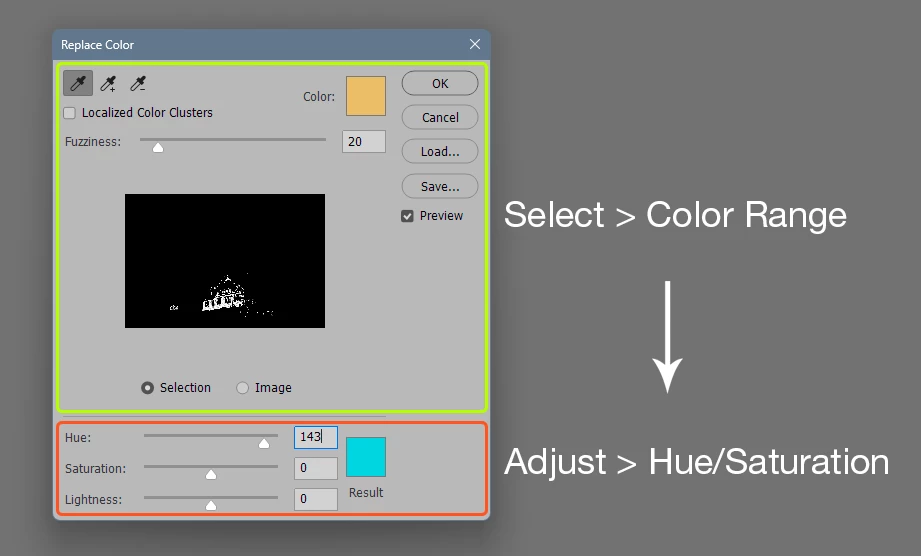
Replace color is one of those convenience commands that just rolls two existing functions into one - but in the process strips the flexibility and usefulness of both. 


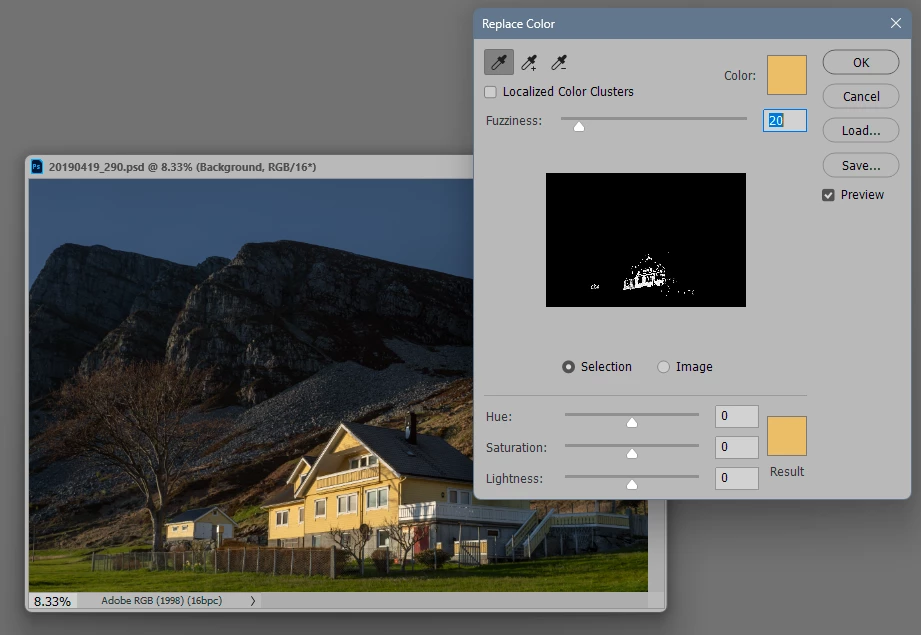
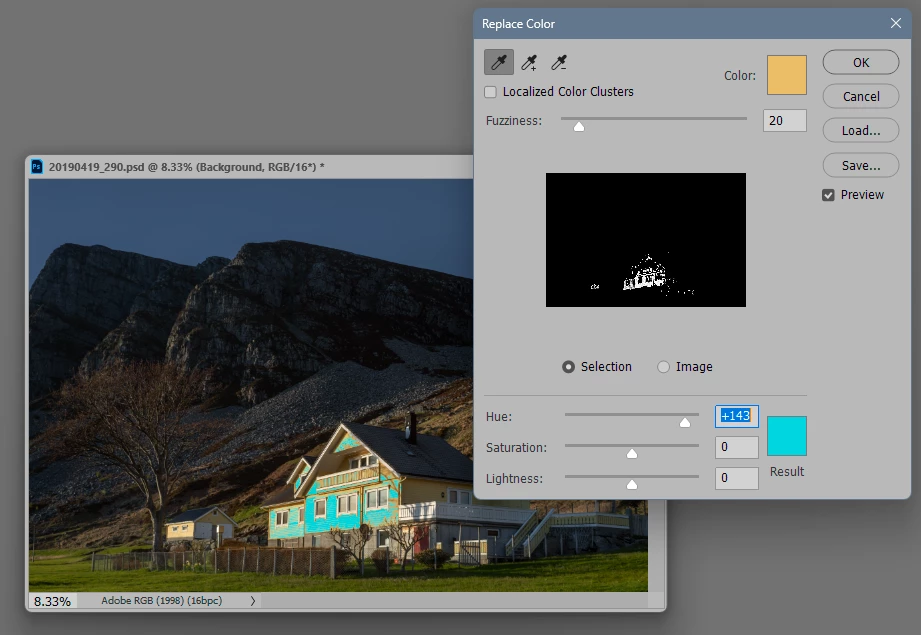
The name is even misleading. You can't really use "replace color" to actually replace color, as this example might show:


The proper way to do this is to use any of Photoshop's many selection tools to select the required area - then use any of Photoshop's many color correction tools to modify that area.


Replace Color just combines two already existing functions into one. They can both be useful of course, but much more effectively if used by themselves:

2 replies

Inspiring
August 15, 2025

Hi Simon, performing the Replace Color action with a script on multiple files sounds reasonable enough. Give me some time and I'll have a prototype for you.

Inspiring
August 15, 2025

Here is the prototype:

var files = []

var btn = {}, fld = {}, g = {}, u

var win = new Window('dialog', 'Multi-File Replace Color')

win.add('statictext', u, 'LAB values to find:')

g.lab = win.add('group')
fld.labL = g.lab.add('edittext')
fld.labA = g.lab.add('edittext')
fld.labB = g.lab.add('edittext')

win.add('statictext', u, 'Fuzziness:')
fld.fuzz = win.add('edittext')

win.add('statictext', u, 'HSL adjustments:')
g.hsl = win.add('group')
fld.hslH = g.hsl.add('edittext')
fld.hslS = g.hsl.add('edittext')
fld.hslL = g.hsl.add('edittext')

btn.files = win.add('button', u, 'Select Files')

g.last = win.add('group')
btn.ok = g.last.add('button', u, 'OK')
btn.no = g.last.add('button', u, 'Cancel')

btn.files.onClick = function() {
  files = Folder.desktop.openDlg(
    'Select single-layer files in which to replace a color', 
    Boolean('multiSelect') 
  )
  btn.files.text = 'Files: '+ files.length
}

btn.ok.onClick = function() {

  var findLab = new LabColor
  findLab.l = Number( fld.labL.text )
  findLab.a = Number( fld.labA.text )
  findLab.b = Number( fld.labB.text )

  var deltaHsl = {
    h: Number( fld.hslH.text ),
    s: Number( fld.hslS.text ),
    l: Number( fld.hslL.text )
  }

  for( i = 0; i < files.length; i++ ) {
    var doc = app.open( files[i] )
    replaceColor( findLab, deltaHsl, Number( fld.fuzz.text ) )
    doc.save()
    doc.close()
  }
  
  
  win.close()
}

win.show()


function replaceColor( findLab, deltaHsl, fuzz ) {

    var d = {}, st = stringIDToTypeID, ch = charIDToTypeID

    d.replaceColor = new ActionDescriptor()
    d.replaceColor.putInteger( ch('Fzns'), fuzz )

    d.lab = new ActionDescriptor()
    d.lab.putDouble( ch('Lmnc'), findLab.l )
    d.lab.putDouble( ch('A   '), findLab.a )
    d.lab.putDouble( ch('B   '), findLab.b )
    d.replaceColor.putObject( ch('Mnm '), ch('LbCl'), d.lab )
    d.replaceColor.putObject( ch('Mxm '), ch('LbCl'), d.lab )

    d.replaceColor.putInteger( ch('H   '), deltaHsl.h )
    d.replaceColor.putInteger( ch('Strt'), deltaHsl.s )
    d.replaceColor.putInteger( ch('Lght'), deltaHsl.l )
    d.replaceColor.putInteger( st('colorModel'), 0 )
    
    executeAction( ch('RplC'), d.replaceColor, DialogModes.NO )
}
Legend
August 15, 2025

Explain or show with screenshots how you do color replacement manually. What objects are we talking about - is the color part of a pixel layer with many shades, a separate layer filled with one color, a text layer, a vector object, an adjustment layer or an effect? It depends on the specifics of your workflow whether it is possible to implement this with scripts or not.

Participant
August 15, 2025

Hi Jazz-y
The images are just a single layer with a basic icon on each made up of shapes (each shape being one of the three colours that i want to change)

I just been trying the Replace colour tool in PS and it doesnt give me the outcome that i require. So the only way for me to do manually at the moment is to using the magic wand tool to select each shape in tool and then to fill that shape with the new colour.

Thinking about it more i dont think its possible to give the correct outcome?

Inspiring
August 15, 2025

"a basic icon on each made up of shapes" sounds like something better accomplished in Illustrator, then output to your preferred bitmap format. Changing the colours would be far easier: highlight one instance, choose "Select > Same > Fill Color", then apply the new colour. No way to do anything like that in Photoshop unless the shapes are vector objects, and they'd still have to be selected individually.