Participating Frequently
May 21, 2025
解決済み

Can white threads sewn onto white fabric be enhanced to reveal the detail?

  • May 21, 2025
  • 返信数 5.
  • 285 ビュー

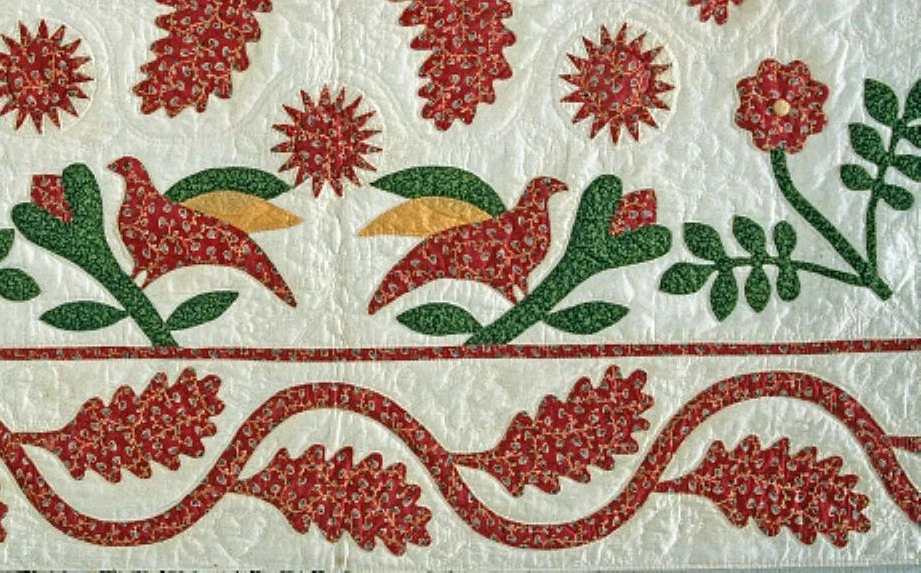
This is a section of a 200 year old quilt.  In some areas you can see the stitching, but not in most areas- it's just too faint right now.  Is there a technique in Photoshop that would bring out the stitching that is there, but is too faint for the eye to see?  If so, could you please provide the name of the tool or technique so I can research this?  This is a question far past my Facebook ability.


Thanks for your help!


解決に役立った回答 twistedquilter

Hi Sherry

As a longtime quilter turned into fiber art 😉 and now composite photo art, I have in the past run into the same situation as you - a photo without much digital info at all, but needs editing.  A fellow quilter sent me a screenshot and asked if I could "help it" so she could finish a catalog for an upcoming quilt show. Similar to yours it had a lot of hand quilting.  I told her I would try.  Wanting to be true to the hand quilting the only thing I could do was to zoom in as close as possible without blurring the area, taking one section at a time. I matched the thread as close as possible with the color picker.  It will be off white toward and ivory color. I used the pen tool on the narrowest setting to make a path. I wanted to have the anchor points in case I needed to adjust it.  Knowing the quilting stitches would have been 1/4 inch or less I took samples of stitches I could see and measurement the length of the stitch samples so I could be as accurate as possible. Then, I followed the path and 'drew' in the stitches as accurately as possible.  Something helpful in your photo is the raised area created by the quilting shows well.  It is time-consuming, but so is hand quilting!  When you show the photo you can add in a very small font that some stitches were digitally edited so the viewer could see their intricacy - or something to that effect.  I hope this helps.  If you need help along the way, just email me or post it here in the community.

返信数 5

Inspiring
May 23, 2025

Hi Sherry

As a longtime quilter turned into fiber art 😉 and now composite photo art, I have in the past run into the same situation as you - a photo without much digital info at all, but needs editing.  A fellow quilter sent me a screenshot and asked if I could "help it" so she could finish a catalog for an upcoming quilt show. Similar to yours it had a lot of hand quilting.  I told her I would try.  Wanting to be true to the hand quilting the only thing I could do was to zoom in as close as possible without blurring the area, taking one section at a time. I matched the thread as close as possible with the color picker.  It will be off white toward and ivory color. I used the pen tool on the narrowest setting to make a path. I wanted to have the anchor points in case I needed to adjust it.  Knowing the quilting stitches would have been 1/4 inch or less I took samples of stitches I could see and measurement the length of the stitch samples so I could be as accurate as possible. Then, I followed the path and 'drew' in the stitches as accurately as possible.  Something helpful in your photo is the raised area created by the quilting shows well.  It is time-consuming, but so is hand quilting!  When you show the photo you can add in a very small font that some stitches were digitally edited so the viewer could see their intricacy - or something to that effect.  I hope this helps.  If you need help along the way, just email me or post it here in the community.

Participating Frequently
May 22, 2025

Thank you all very much for your kind and detailed replies!  Unfortunately, I only have an existing photo from the Smithsonian, and the original 200 year old quilt is not accessible.  It really does help, though, to know that your advice is available for use when I do have access to the actual antique quilt.  Thanks again!

D Fosse
Community Expert
Community Expert
May 22, 2025

The image as it is has no separating information. Photoshop can only amplify information already there. In the final image, if you can't see it, it's not there. This is done with photographic techniques, pre-processing, not post-processing.


If the white thread is of different origin than the fabric, IR (or possibly UV fluorescence) would probably show it clearly.  White is only white in visible light; in other wavelengths they will most likely reflect differently and turn up with different "color". My immediate bet is on IR. (IR is inherently monochrome, so in reality different tone, but you can combine with visual wavelengths to produce false color images).


Raking light may also show it more clearly.


For this you need an IR/UV modified camera where the bandpass filter ("hot mirror") has been removed from the sensor. This extends the sensor's sensitivity into the infrared and ultraviolet ranges, and then you can use special bandpass filters to block visible light, leaving only the wavelengths you want.


There are companies that specialize in this, and ship new cameras with this modification. I have a Sony a7r IV thus modified. With a good macro lens such as the Sony 90/2.8, and the native sensor resolution at 9504 x 6336 pixels, you can go into as much detail as you like. This is forensic level. You use normal light for IR, I use studio flash units. For UV you need UV-emitting lights ("black light").

Trevor.Dennis
Community Expert
Community Expert
May 22, 2025

I wonder if Dag would have any ideas on this.  The museum quality work he does would surely be relevant.  I'd be approaching it as a macro shot using good quality, high resolution full frame camera.   I used a Canon 5DS for my comercial work.  Usually with the Canon 100mm macro lens, and two Bowens 250WS heads.  I think Dag uses 35mm, but he might even use large format for his museum work. 


@D Fosse 


@Sherry27520529cbtn  How big is the quilt?  One thing is for sure.  The screen shot you shared is not going to cut it.

Semaphoric
Community Expert
Community Expert
May 21, 2025

If you could re-photograph it with raking light at a low angle, that could enhance the three dimensional texture of the quilting.