
Known Participant
July 26, 2023
Question

Cancel Button Doesn't Stop Remove Tool Processing

  • July 26, 2023
  • 1 reply
  • 249 views

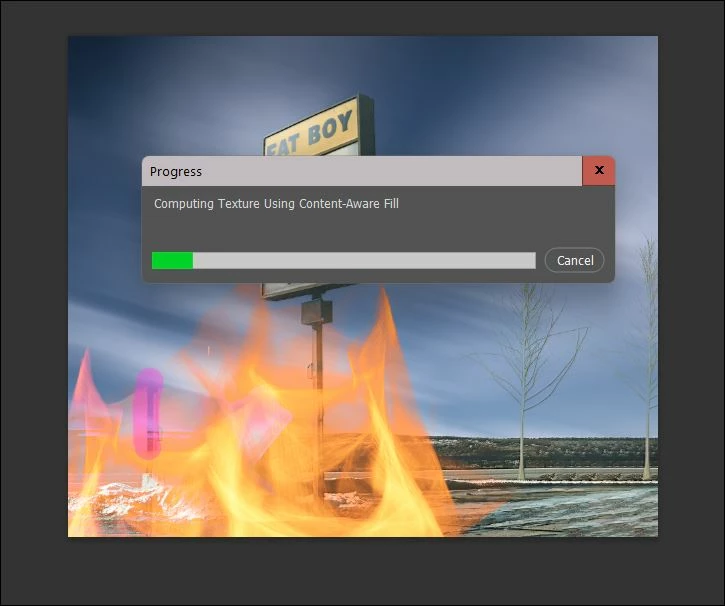
I tried to use the Remove Tool on an empty layer to remove an unsightly line (pink line in the snip below). My options bar setting for the tool is set to remove after each stroke. It seemed to hang and wasn't processing, so I clicked the "Cancel" button. Then also tried the ESC key when the Cancel button didn't do anything. Nothing stopped the Remove Tool from processing and it clearly was in a circle of death that only exiting Ps stopped. I'll include a snip of what I saw in my Win 11, Ps 2023 (rel. 24.6) workspace. It seemed to me that "Cancel" should cancel the processing. But it didn't.
 

This topic has been closed for replies.

1 reply

AxelMatt
Community Expert
Community Expert
July 26, 2023

In a first step try to reset the preferences of Photoshop using the steps described here: 

https://helpx.adobe.com/photoshop/using/preferences.html#reset-preferences 

Please backup your settings before resetting the preferences. You can check: 

https://helpx.adobe.com/photoshop/using/preferences.html#backup-photoshop-preferences 


Another try is to mark the option "More stablefor Remove....".

  1. Go to Preferences > Image Processing... 
  2. Choose "More Stable" for Remove Tool Processing. 
  3. Restart Photoshop and check agin.


My System: Intel i7-8700K - 64GB RAM - NVidia Geforce RTX 3060 - Windows 11 Pro 25H2 -- LR-Classic 15 - Photoshop 27 - Nik Collection 8 - PureRAW 6 - Topaz Photo AI