Participant
April 29, 2021
Question

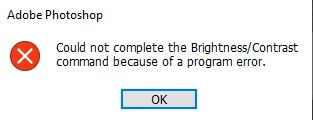
Cannot change Brightness/Contrast because of a Program error
  • April 29, 2021
  • 1 reply
  • 2516 views

Whenever I try to change the Brightness/Contrast on certain layers i get this error. I have already uninstalled and reinstalled Photoshop without success. 

This topic has been closed for replies.

1 reply

jane-e
Community Expert
Community Expert
April 29, 2021

@gregorpotter1 wrote:


... on certain layers...


Since this is happening on some layers and not others, can you show some screen shots of the Layers panel in both cases where you get the error and also where you succeed? What is different about the layers where is works and where it doesn't? Also, make sure you are not on a layer with no pixels.


Is there anything else different, such as color mode or bits or ???


You may need to reset preferences, but let us see a screenshot first.


~ Jane


max G
Known Participant
June 3, 2022

Hi Jane,

as long as I can remember, I've occasianally gotten "Could not complete the Brightness/Contrast command because of a program error". I have had this error persistently, through every upgrade and on every computer (PC and Mac) I've ever worked on (and at a bunch of computers at different companies I worked for). When will Adobe take care of this? 

Thanks!

Max

War Unicorn
Community Expert
Community Expert
June 3, 2022

Did you try resetting preferences like Jane suggested?

https://helpx.adobe.com/photoshop/using/preferences.html

(About halfway down the page.)