

brucekorb
Inspiring
April 27, 2022
Answered

cannot disable pen pressure control

  • April 27, 2022
  • 5 replies
  • 783 views

1. I started typing as a "Discussion" and decided it was better as a "Bug". YOUR DAMN WEB SITE THROUGH OUT ALL MY TYPING. How stupid and frustrating!!! (yes, I'm getting irritated)


2. Since I am not able to keep _precisely_ the same level of pressure on the pen while I am drawing, especially when using a healing brush, I want a fixed size, non-varying brush. But I can't do that. If I select "off" for brush dynamics, the very instant I start to use the brush it automatically reverts to automatic and resizes the brush for me. I do not want automatic brush dynamics. I want it permanently disabled for all time. Never ever again is soon enough.
This topic has been closed for replies.
Correct answer brucekorb

RFE: enable the brush refinement menu.  Anyway:

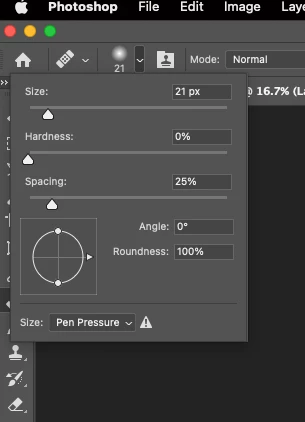
That menu pops out when you select the itsy bitsy "v" that lies between the "toggle the clone source panel" icon and the "click to open the brush options" icon. It shouldn't be that obscure. Anyway, this time, to prove that it goes away, I set it to off and cloned some image with wildly varying amounts of pressure. The cloned pixels were all of the same width proving to myself that I did something or other different this time. 😞 I tried closing the image and redoing it and the setting was retained. I've not tried a PS close and open or a reboot, but I'm guessing that previously I didn't do what I'd thought I'd done.


SO: it would all be more obvious if the manipulable settings were in the brush settings menu instead of that unlabeled itty bitty menu. 🙂 Thank you.

5 replies

brucekorb
brucekorbAuthorCorrect answer
Inspiring
April 27, 2022

RFE: enable the brush refinement menu.  Anyway:

That menu pops out when you select the itsy bitsy "v" that lies between the "toggle the clone source panel" icon and the "click to open the brush options" icon. It shouldn't be that obscure. Anyway, this time, to prove that it goes away, I set it to off and cloned some image with wildly varying amounts of pressure. The cloned pixels were all of the same width proving to myself that I did something or other different this time. 😞 I tried closing the image and redoing it and the setting was retained. I've not tried a PS close and open or a reboot, but I'm guessing that previously I didn't do what I'd thought I'd done.


SO: it would all be more obvious if the manipulable settings were in the brush settings menu instead of that unlabeled itty bitty menu. 🙂 Thank you.

Pete.Green
Community Manager
April 27, 2022

Hi Bruce, sorry about the community interface losing your initial post. I'll make a request to the team to see if we can retain posts when changing post types. You're right, that is frustrating. 


Regarding healing brush and pressure: Can you provide a screenshot of the setting you're looking at? and are changing?


When I select the healing brush, my brush settings panel is grayed out, so it doesn't look to me that there are any pressure changes to be made or to revert once changed, nor was I able to find anything in the Clone Source panel relative to pressure. If you can show a screenshot of where you're finding that option that would be useful as well.Unless I'm missing something (which is possible), this may be a feature request and less of a bug. 


My clone source panel:

The brush settings grayed out when I have healing brush selected.


Regards,

Pete

Participating Frequently
September 12, 2024

Same problem, often i wonder how Adobe feels that thier product is worth the huge monthly fee. So often ive lost hours of work time for crippling bugs as simple as this. Just dont know what to say.


AxelMatt
Community Expert
Community Expert
September 12, 2024

Don't reactivate years old threads. If you have problems/questions with Photoshop create a new thread and describe your problem/question as detailed as possible. Don't use phrases as "same problem".

Include also infos about your system.


My System: Intel i7-8700K - 64GB RAM - NVidia Geforce RTX 3060 - Windows 11 Pro 25H2 -- LR-Classic 15 - Photoshop 27 - Nik Collection 8 - PureRAW 6 - Topaz Photo AI
brucekorb
brucekorbAuthor
Inspiring
April 27, 2022

P.S. I did find the pull down menu that was the tiny "v" between the brush size selector and the open/close clone source pane. Therein is a setting for "pen pressure" and "off", but it *AUTOMATICALLY* goes back to "pen pressure" once you try to use the pen with the pen setting to "off". This be a bug.

brucekorb
brucekorbAuthor
Inspiring
April 27, 2022

I guess I wasn't clear enough. I want it off for me. I cannot figure out how to do that, having now spent approaching an hour on the problem. My mouse hand isn't smooth enough and my pen hand isn't 100% rock steady with the pressure. So, I need it off and can't seem to do that.

Community Expert
April 27, 2022

I don't think that the automatic brush dynamics will ever be disabled by default (I wouldn't want it to) since such a huge number of users rely on it on their tablets.