Participating Frequently
January 12, 2024
Answered

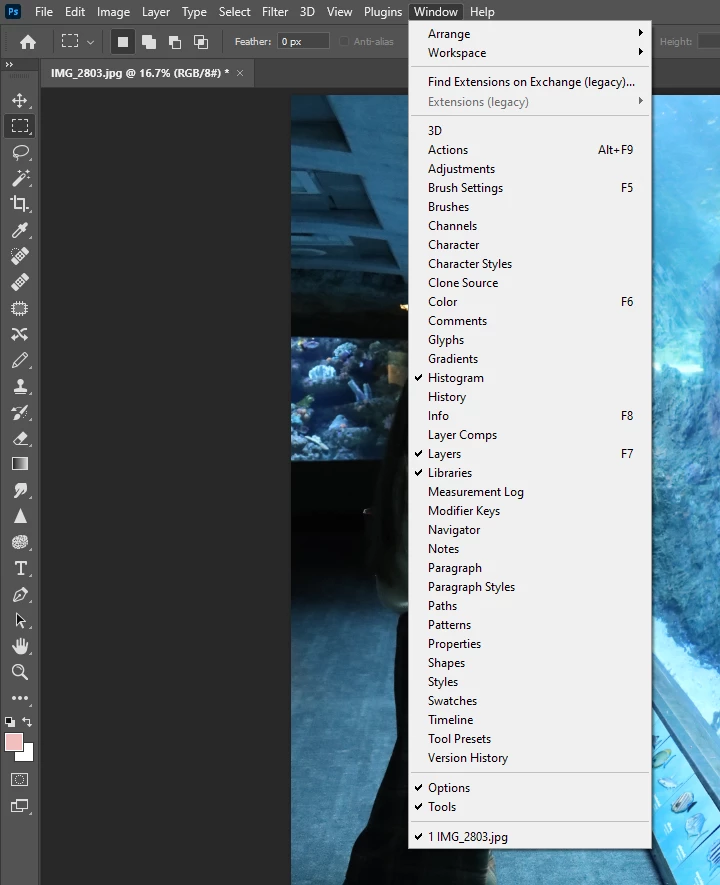
Cannot find the contextual toolbar anywhere.

  • January 12, 2024
  • 11 replies
  • 276 views

I had used the generative fill when it first launched and it worked fine. Went back to photoshop after a few months and can't find it anywhere. It is not in the list when I click on window. I am using version 25.3.1
This topic has been closed for replies.
Correct answer Bojan Živković11378569

There seems to be a discrepancy between the Adobe CC app and the System Info. The former shows version 25.3.1, while the latter shows version 23.5. You could try installing an earlier release, such as 25.2 or 24.7.2, and check if that makes any difference.

11 replies

Bojan Živković11378569
Community Expert
Community Expert
January 12, 2024

To use Generative Fill, you need to right-click on a selection. Is this option available in the right-click menu? Selection tool like Rectangual Marquee must be active.