Participant
May 17, 2021
Answered

Cannot save to jpeg from multi-layer file, 90% of saving options are missing?

  • May 17, 2021
  • 2 replies
  • 1274 views

Hi there,


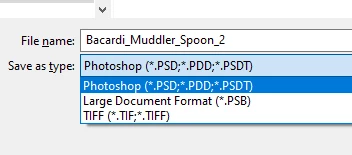
All of a sudden, I cannot save a multi-layer Photoshop file as a jpeg. See attachment for only save options which are .psb & .tiff.

- Yes its RGB

- Yes its 8 Bit

- Yes I have Space

- No - its not too big.. I have tested with a 300px and a 3000px @14451451 doesnt make any difference.


I can save and get all the save options once I have flattened the file. I presume I have clicked a button somewhere? (I hope) The only recent change is that I have updated all video card drivers.
Thanks in advance if someone can help 🙂

This topic has been closed for replies.
Correct answer davescm

From version 22.4, if your file contains items that are not supported in your required format (e.g. layers or 16 bits/channel) then the file format is moved to the Save a Copy function. This was driven by changes in the Mac Operating System, although the changes are applied to both Mac and Windows versions to keep them aligned.


https://helpx.adobe.com/photoshop/using/whats-new.html


Dave

2 replies

akil92908095
Participating Frequently
June 18, 2021

Gahhhhh.  This is beyond WTF moment today.  Ugh..........I'm hating Adobe more by the minute.  Simple change?  I guess for a new user but for 20+ years, this change is definitely going to be a headache to get used to -_-

jane-e
Community Expert
Community Expert
June 18, 2021

Hi @akil92908095 

As of 22.4.2 you can revert to the previous behavior in Preferences > File Handling > File Saving Options:

  • Enable Legacy Save As
  • Do not append Copy


See this help page for details and cautions:
https://helpx.adobe.com/photoshop/using/saving-images.html  

~ Jane


TashaElis2014
Participant
August 23, 2021

This worked!  You're awesome!  Thank you so much for this!


davescm
Community Expert
davescmCommunity ExpertCorrect answer
Community Expert
May 17, 2021

From version 22.4, if your file contains items that are not supported in your required format (e.g. layers or 16 bits/channel) then the file format is moved to the Save a Copy function. This was driven by changes in the Mac Operating System, although the changes are applied to both Mac and Windows versions to keep them aligned.


https://helpx.adobe.com/photoshop/using/whats-new.html


Dave

adele5CEAAuthor
Participant
May 17, 2021

Thanks for your prompt answer Dave... New it was going to be something simple