
Inspiring
June 20, 2017
Answered

Cannot stroke a path

  • June 20, 2017
  • 4 replies
  • 25621 views

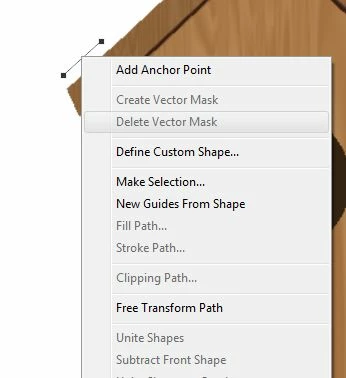
I am using PS CC 2017 and I'm having problems stroking a path.   I think I have a setting wrong.  The option is greyed out.  No problem with this in my old PS.  Can you tell me what setting I may have wrong for this to happen?
This topic has been closed for replies.
Correct answer K´mo

You have clicked the mask button. Therefore you have the vector mask and maybe it is still active. You can still stroke it if you have targeted something that you can draw.

4 replies

Participant
March 11, 2020

You all are so sassy and unhelpful, lmao.


The solution is to simply select a layer.


The path stroke options are greyed out because you did not have a layer selected, it has nothing to do with any options, settings, or preferences.

Participant
April 7, 2020

Hi, 

I have tried all of these things and my photoshop still doesn't allow me to 'stroke path' after making a shape with the pen tool. Do you have any advice on this?

K´mo
Participating Frequently
June 20, 2017

You are editing a vector mask. It's not a pixel mask so you can't stroke there. You need to have pixel layer or mask and path selected. You may have to copy the path from vector mask, activate pixel layer and then you can make a stroke.

c.pfaffenbichler
Community Expert
Community Expert
June 20, 2017

The screenshot seems pretty much useless as it does not include pertinent Panels like the Layers Panel and the Paths Panel. (edited)

Instead of using »Stroke Path« destructively using a Shape Layer with Stroke (as set in the Options Bar) may be a better alternative.

S_Gans
Community Expert
Community Expert
June 20, 2017

Honestly, it looks to me like you're missing with the selection tool. All of the options that would be active if you were right clicking directly ON the path are grayed out. The thing that, to me indicates it the most is the "Add Anchor Point" normally would show with a checkmark next to it if you were right on the path. That's the default behavior when right clicking a path with the selection tool. Please confirm that you ARE using the black arrow (selection tool, not 'direct selection tool') as well.

Adobe Community Expert / Adobe Certified Instructor
pslane1Author
Inspiring
June 21, 2017

I am using the pen tool.  The same way I do it with an older version of PS and it works fine there.  It's a pain to have to save everything , close out and re-open in an older version of PS, which is exactly what I will have to do if this keeps up.

The problem is probably in the top bar.  I will send another screen shot of that.  Should the word selection be there?

Thanks.

K´mo
K´moCorrect answer
Participating Frequently
June 21, 2017

You have clicked the mask button. Therefore you have the vector mask and maybe it is still active. You can still stroke it if you have targeted something that you can draw.