
Known Participant
October 28, 2018
Question

Canvas Size bug in photoshop 2019?

  • October 28, 2018
  • 2 replies
  • 1108 views

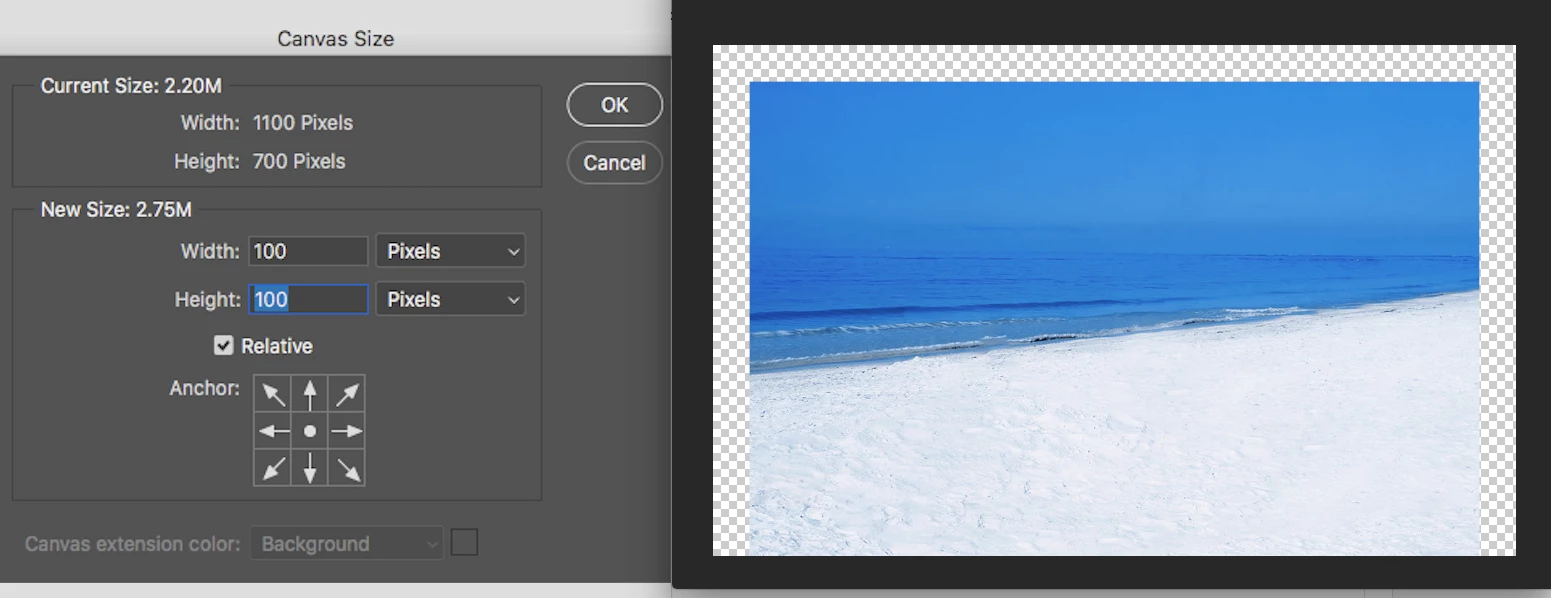
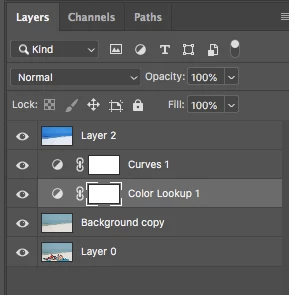
Anyone having issues with this? Maybe I'm doing something wrong but occasionally when using canvas to add a frame to photos, my canvas does not get adjusted on the bottom border, as attached picture shows. Unless there is something that needs to be done with layers when using this feature, I think this might be a bug as it works most of the time. Edit: Just to make sure, I deleted all layers except the stamp, and it worked correctly. My question is, this should work just the same with multiple layers right?
    This topic has been closed for replies.

    2 replies

    gener7
    Community Expert
    Community Expert
    October 28, 2018

    My suggestion would be to Image > Duplicate your file and merge (not flatten) the layers on the copy, and then try applying the canvas.

    Gene

    Chuck Uebele
    Community Expert
    Community Expert
    October 28, 2018

    Gene, just merging will still leave pixels outside the canvas. You need to either flatter or crop with delete cropped pixels checked.

    JJMack
    Community Expert
    Community Expert
    October 28, 2018

    Correct mcexplored need to  track down why there are not equal empty borders on the document sides.   Layers can have pixels in added canvas areas.  Photoshop may not be displaying the whole canvas area at the zoom level all may not  fit is the windows being used.  There could also be a problem in his install or preferences or tools.

    JJMack
    JJMack
    Community Expert
    Community Expert
    October 28, 2018

    The only layer that Pixels will be add or removed from when you change a document canvas size is a Photoshop Background layer.  That is a special layer that does not support transparency.  So if you add cancans background colored pixels will be added to the background layer, If you remove canvas that area will be cropped from the back ground layer,  The Background layer is always 100% opaque and is Canvas size.

    All other layer pixels are not changed when you change a document canvas size. All that changes  are the layers  position over the canvas You bottom border may be effect the the Zoom percentage and what fits in the image window,  I can not tell from what you posted what I'm looking at.  I see no Photoshop UI know what has been  posted. I see no frame information rulers scroll bars title etc

    JJMack
    Known Participant
    October 28, 2018

    Ok, I get the gist of what you are saying; I will play around with layers to try to understand it better. In other words, is the behavior I'm getting with that top layer not getting a full border normal? My basic understanding of your explanation would lead me to believe otherwise, given that the background layer canvas is expanding, so it should be completely visible. Thanks.

    JJMack
    Community Expert
    Community Expert
    October 28, 2018

    Layers other than the background layer can be any size and  even small layer can have  pixels out side the canvas area and these will be clipped(masked) from view in the image window.   If you add canvas the clipped pixels may no longer be clipped  they may will be visible in the canvas area added.   If you target a  target a layer and use Free transform.  The transform dialog box will outline the bounds of the layers pixels layers may well have pixels outside your document canvas area.

    Photoshop has many bugs there usually there is a reason for what you see on you display.  You need to look at everything involved to know if what you see is right or wrong.   Even marks that ruin your image may actually be in  some layer.

    JJMack