_Philip_
Inspiring
September 15, 2020
Answered

Canvas size does not allow for expansion. Bug?

  • September 15, 2020
  • 4 replies
  • 555 views

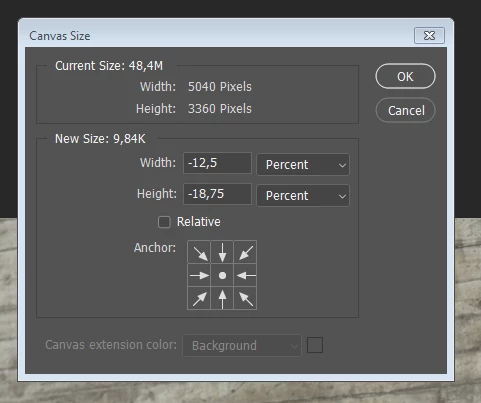
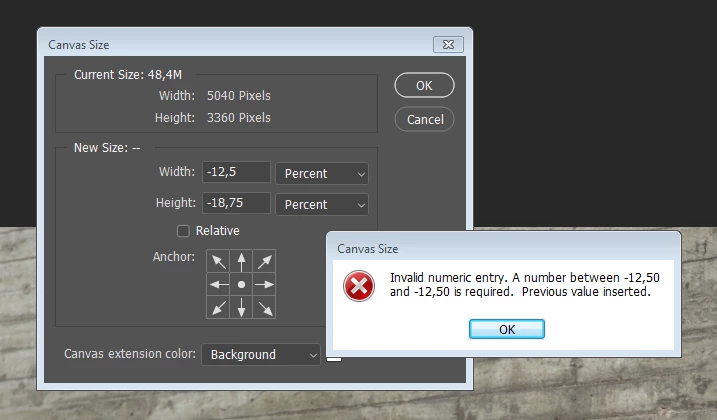
This is odd. When trying to expand my canvas. Photoshop just says no and only allows me to reduce/crop the canvas. First screenshot shows what happens when trying to expand width. Second just shows the box after clicking ok (changing the arrows to reduce/crop canvas). 


What's up?
 

This topic has been closed for replies.
Correct answer _Philip_

It just started.


Excellent points regarding versions. For reference: I'm running Win7 ent SP1 and ID 15.1.1 x64.


However, the problem seem to have solved itself by restarting the computer a couple of times so... Eh X_X 


Thanks for your time! : ) 


4 replies

c.pfaffenbichler
Community Expert
Community Expert
September 15, 2020

Is there any doscernible connection between teh current Canvas Site and the numbers the alert gives? 

jane-e
Community Expert
Community Expert
September 15, 2020

Did this just start or has it been like this? As a workaround to get through this project, try resizing the canvas with the Crop tool and crop larger.


What are your OS and PS versions? (Give exact versions.)

~ Jane

_Philip_
_Philip_AuthorCorrect answer
Inspiring
September 22, 2020

It just started.


Excellent points regarding versions. For reference: I'm running Win7 ent SP1 and ID 15.1.1 x64.


However, the problem seem to have solved itself by restarting the computer a couple of times so... Eh X_X 


Thanks for your time! : ) 


c.pfaffenbichler
Community Expert
Community Expert
September 15, 2020

I think you either forgot to check »Relative« or you inadvertently entered nevative values.  

A negative canvas size is naturally not meaningful. 

_Philip_
_Philip_Author
Inspiring
September 15, 2020

I forgot to add: When changing to percent, the values are set (automatic) to the negative values seen in the screenshots.

c.pfaffenbichler
Community Expert
Community Expert
September 15, 2020

Then please show what happens when you set pixel values. 

_Philip_
_Philip_Author
Inspiring
September 15, 2020

Sure - here you go : )