Inspiring
November 3, 2019
Answered

Canvas Size gone after update

  • November 3, 2019
  • 3 replies
  • 417 views

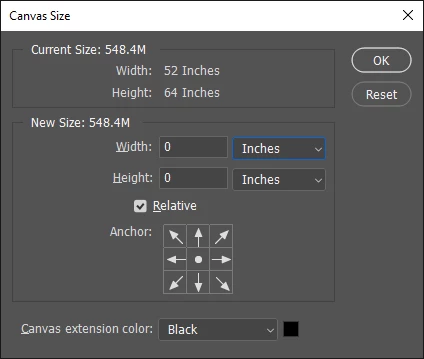
After upgrading to 20.0.7 if I drag any image into the workspace and hit Image > Canvas Size it shows a width and height of ZERO. Above the zeroes, if I choose inches, it tells me 16x20. But, If I try to expand the canvas to 18x22 it explodes the image to 34x42 inchoes???? If I try a second time at 18x22 inches it blows it up to 52x64 inches? WTH?
This topic has been closed for replies.
Correct answer Semaphoric

You have the Relative box checked. Try un-checking it.

3 replies

Inspiring
November 4, 2019

Yep, that fixed it!

gener7
Community Expert
Community Expert
November 3, 2019

Relative is set at zero for times when you want to expand the canvas by a custom amount without having to enter the exact size. For example entering .5 inches in both width and height fields will allow for a .5 in border around your image by expanding the canvas by that amount. If your image has a Background layer, you can choose a border color of your choice by clicking on the black canvas color square. Saves time in a lot of cases.

Semaphoric
Community Expert
SemaphoricCommunity ExpertCorrect answer
Community Expert
November 3, 2019

You have the Relative box checked. Try un-checking it.