
Inspiring
August 5, 2021
Answered

Canvas Size not working correctly

  • August 5, 2021
  • 3 replies
  • 2708 views

I want to add a border to an image  by increasing the canvas size in such a way that it is increased by, for example, 1000px on three sides but by 1500px on the bottom.  I have previously had no issue doing this.  Today it makes the increase by putting the image right up against the top edge.  
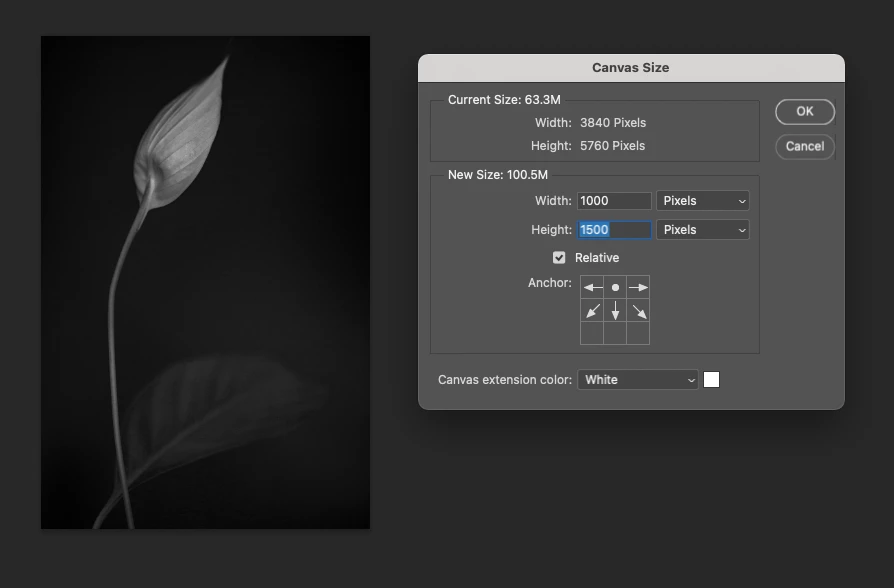


This results in:
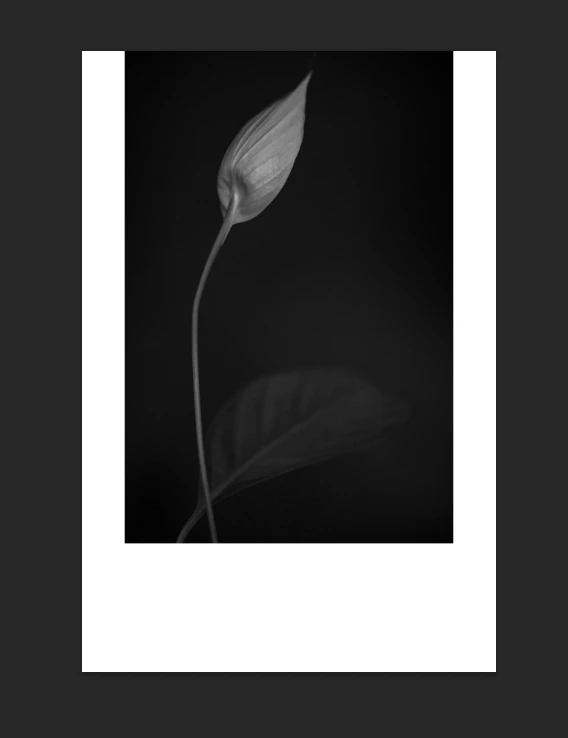
 

which is quite obviously NOT what I want or need.

If I try this instead:
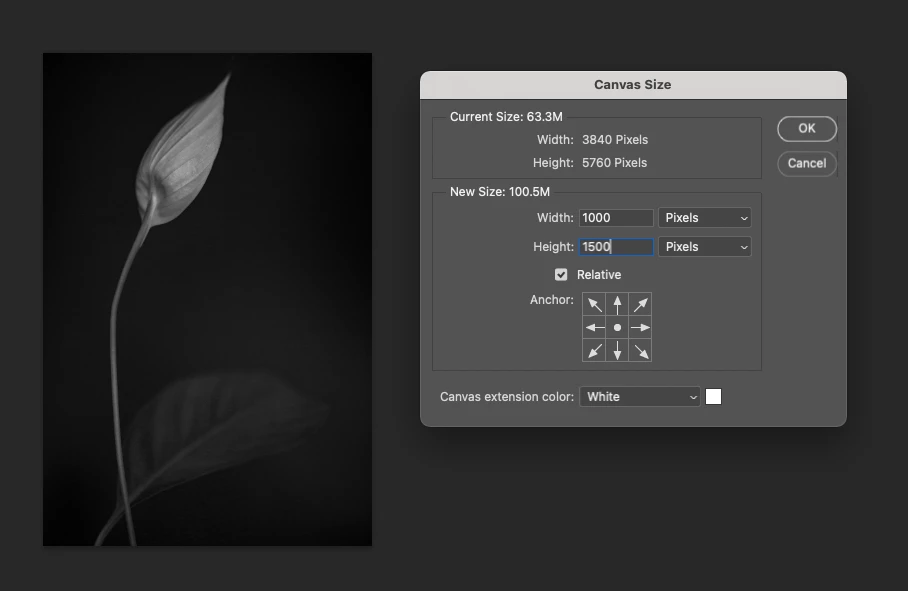
It results in this:
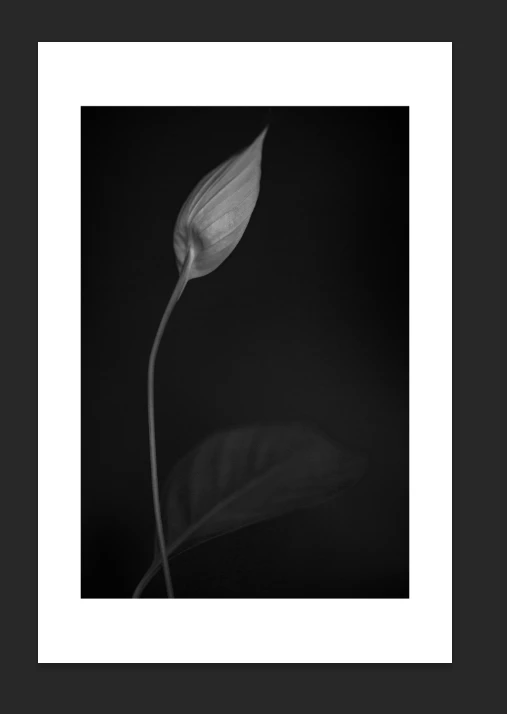
which is also no use!


This feature was working yesterday!  Any tips gratefully accepted.


(I'm working on a single layer...it's the only way I can get the canvas extension colour to work - if I have all the layers there I can only have white.)


This topic has been closed for replies.
Correct answer Bojan Živković11378569

In your first screenshot everything works fine because you are anchoring or limiting expansion only to the bottom, please see again your own screenshot.


'This feature was working yesterday!  Any tips gratefully accepted.'

Maybe but you did it in different way by separating canvas size into two pases as suggested by @c.pfaffenbichler 


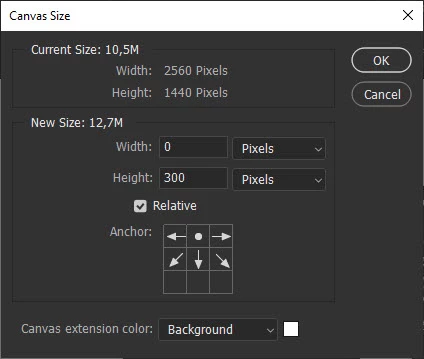
If you want to add extra canvas size only to the bottom then revisit Canvas Size and set up things as in your first screenshot but this time type 0 for width. For Height type number of pixels you want to expand only to the bottom and ensure that you have limited expansion only to the bottom part (see screenshot below)

\

In short: go to Canvas Size, check Relative and Type 2000 in both Width and Height fields if you want to add 1000 pixel on each side.


Revisit Canvas Size, check Relative, click on top arrow to anchor to the bottom as on my screenshot, type 0 in Width and 500 in Height. That will add 500px only to the bottom and you will have three sides expanded for 1000px and bottom side expanded for 1500px.

3 replies

Bojan Živković11378569
Community Expert
Community Expert
August 5, 2021

In your first screenshot everything works fine because you are anchoring or limiting expansion only to the bottom, please see again your own screenshot.


'This feature was working yesterday!  Any tips gratefully accepted.'

Maybe but you did it in different way by separating canvas size into two pases as suggested by @c.pfaffenbichler 


If you want to add extra canvas size only to the bottom then revisit Canvas Size and set up things as in your first screenshot but this time type 0 for width. For Height type number of pixels you want to expand only to the bottom and ensure that you have limited expansion only to the bottom part (see screenshot below)

\

In short: go to Canvas Size, check Relative and Type 2000 in both Width and Height fields if you want to add 1000 pixel on each side.


Revisit Canvas Size, check Relative, click on top arrow to anchor to the bottom as on my screenshot, type 0 in Width and 500 in Height. That will add 500px only to the bottom and you will have three sides expanded for 1000px and bottom side expanded for 1500px.

Inspiring
August 5, 2021

Okay so what I meant was that my brain has been working fine since 2011 and today that's what gave out, not photoshop.  How embarassing.  Thank you everyone!

c.pfaffenbichler
Community Expert
Community Expert
August 5, 2021

Photoshop’s »Canvas Size« has been behaving as it does currently for a long time. 


And if you think regulars on this Forum might be impressed by you having worked with Photoshop for one decade then that seems unlikely. 

c.pfaffenbichler
Community Expert
Community Expert
August 5, 2021

Your described process (being able to add Xpx on three sides and Ypx on the fourth) is not how »Canvas Size« has worked for decades. 

And the settings in your first screenshot add 500px left and right, not 1000px. 


You may want to split the operation into two parts – adding 2000px relative generally, adding 500px relative at the bottom. 

Mylenium
Legend
August 5, 2021

Are you sure you didn't actually use the crop tool, not canvas resize?


Mylenium

Inspiring
August 5, 2021

I am sure.  Look at the screen shots for a start  - it clearly says 'canvas size' at the top.  I've been using this feature since I started using photoshop in about 2011 and this is the first time I've had an issue!