Participant
January 16, 2020
Answered

Card Design

  • January 16, 2020
  • 2 replies
  • 466 views

This topic has been closed for replies.
Correct answer jane-e

Hi Jawad.

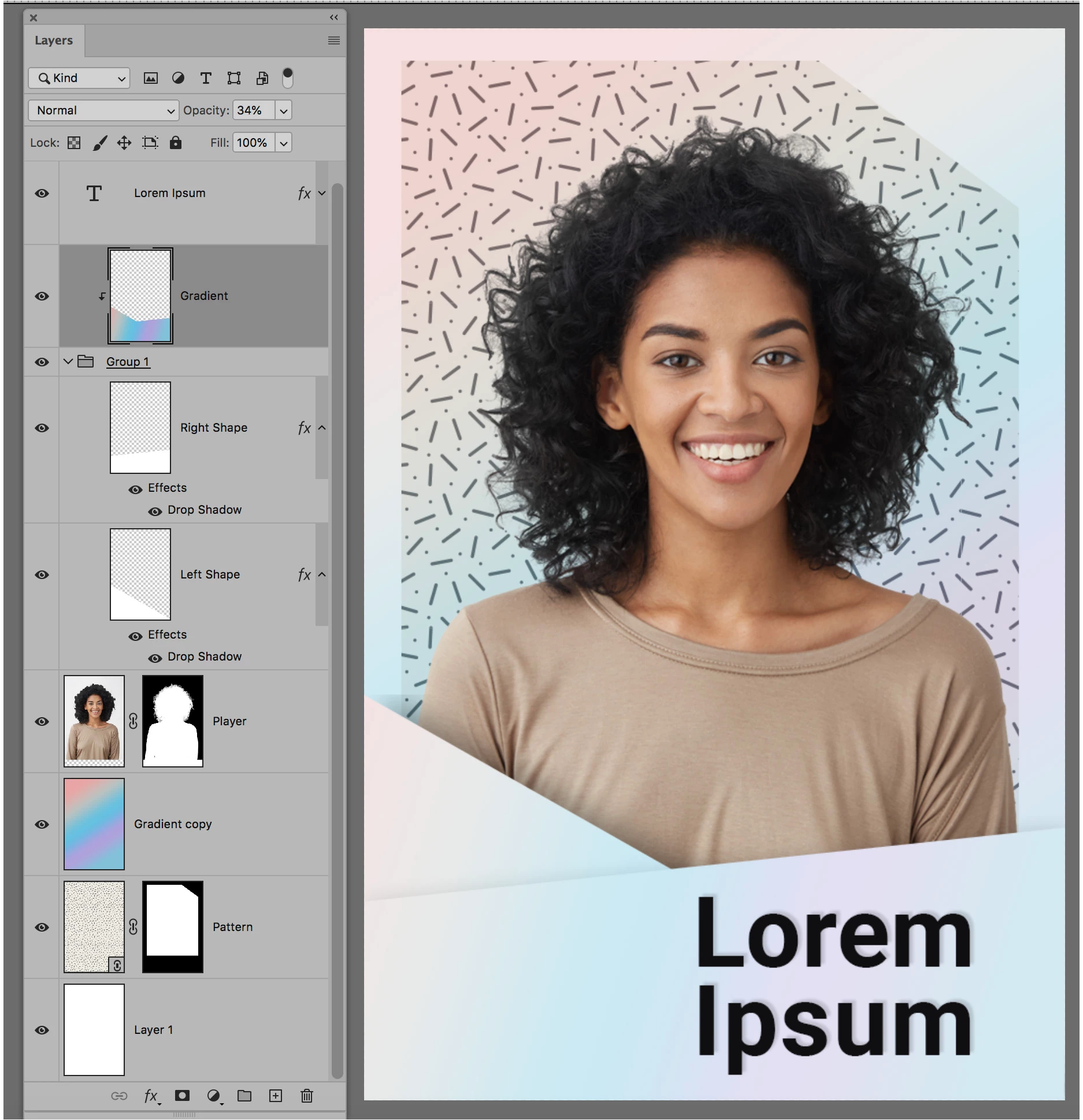
Here's a screenshot of my layers — it may help. I worked from the bottom up.

  • White layer
  • Pattern layer with mask. You can purchase from Adobe Stock or make one.
  • Gradient: Window > Gradient. I used Iridescent. You can select one or make your own.
  • Image of the player, masked
  • The two shapes with a slight drop shadow at the tops
  • The same gradient in a new layer applied within a selection of the two shapes
  • The type layer with the name of the player
  • You also need the logo at the top right

I hope this helps.

~ Jane


2 replies

Sahil.Chawla
Adobe Employee
Adobe Employee
January 16, 2020

Hi there,

Could you please let us know how may we help you out?
We're here to help, just need more info.

Regards,
Sahil

Participant
January 25, 2020

I want to create theses card design on photoshop such as the rainbow reflection and the pattern any help will be appreciated.

Regards Jawad

jane-e
Community Expert
Community Expert
January 16, 2020

Do you have a question about Photoshop?

Participant
January 25, 2020

I want to create theses card design on photoshop such as the rainbow reflection and the pattern any help will be appreciated.

jane-e
Community Expert
jane-eCommunity ExpertCorrect answer
Community Expert
January 25, 2020

Hi Jawad.

Here's a screenshot of my layers — it may help. I worked from the bottom up.

  • White layer
  • Pattern layer with mask. You can purchase from Adobe Stock or make one.
  • Gradient: Window > Gradient. I used Iridescent. You can select one or make your own.
  • Image of the player, masked
  • The two shapes with a slight drop shadow at the tops
  • The same gradient in a new layer applied within a selection of the two shapes
  • The type layer with the name of the player
  • You also need the logo at the top right

I hope this helps.

~ Jane