
Participating Frequently
February 1, 2017
Answered

CC 2017 Extension not listed in Window > Extensions

  • February 1, 2017
  • 5 replies
  • 11165 views

Hi!

I've recently updated to CC 2017, but now one of my extensions won't show anymore in Window > Extensions menu. It's the Beauty Retouch Panel 3.1. It's the only extension that's not showing up.

I've read about some people that got an error message, but that's not the case. It's like it wasn't even installed.

Is there someone else having the same issue with this extension on CC 2017?
This topic has been closed for replies.
Correct answer Nancy OShea

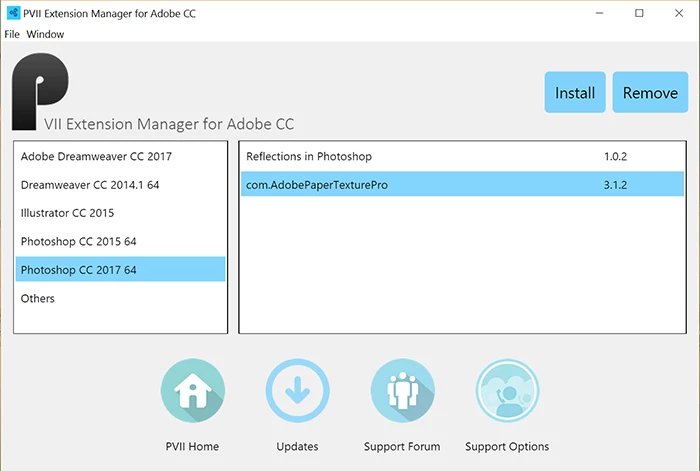
I use a free Extension Manager from Project Seven to manage my 3rd party extensions.  With this I can install or remove extensions from most of my  CC products.

PVII Extension Manager for Adobe Creative Cloud

Nancy

5 replies

theingart74095622
Participant
June 14, 2018

EXTENSIOM MANAGER FOR ONLINE ONLY?

Nancy OShea
Community Expert
Community Expert
June 14, 2018

Ever since Adobe gave up  on their own Extension Manager, I have used a free 3rd party EM from DMX Zone which works for me in Photoshop, Dreamweaver and Illustrator.

https://www.dmxzone.com/go/22670/dmxzone-extension-manager-for-dreamweaver/

I don't use extensions from the Adobe Add-Ons page.  I find it's best to get extensions directly from the 3rd party web sites.

Nancy O'Shea— Product User & Community Expert
Participant
November 12, 2017

Hi AlexBraga​ have you found a solution? I have the same problem

AlexBragaAuthor
Participating Frequently
November 13, 2017

tommylig  wrote

Hi AlexBraga  have you found a solution? I have the same problem

Not yet. To be honest, I've downgraded to CC 2015.5, since it works flawlessly, and never tried again with more recent versions

maxwella50484981
Participant
September 7, 2017

i had the same issue but managed to fix it on a windows pc here are the steps

After installing using the Beauty retouch panel

1. Navigate back into "C:\Program Files (x86)\Common Files\Adobe\CEP\extensions"

2. Move to the directory where Beauty Retouch Panel is installed.

3. Open the CSXS directory

4. Open the manifest.xml file with a text editor (Ensure you are running your text editor as admin).

5. Look for :

<HostList>

<Host Name = "PHXS" Version = "[14.0,17.9]" />

<Host Name = "PHSP" Version = "[14.0,17.9]" />

</ HostList>

6.Change both [14.0,17.9] -> [14.0,18.1] and save.

7. Open photoshop to check if the Beauty Retouch panel is showing in the extensions. It should give you an error when you click it

8. Close photoshop

9. Press and hold the windows key+R to open run

10. Type "regedit" and press enter

11. Navigate to HKEY_CURRENT_USER/Software/Adobe/CSXS.7

12.Then add a new entry PlayerDebugMode of type "string" with the value of "1"

Every thing should be fine

Loic.Aigon
Legend
September 7, 2017

Every thing should be fine

Risk is that if extension is signed, any modification may corrupt the extension and will not properly work afterwards. The debug key has you mentionned indeed works because you tell the CEP engine not to deal with security which in some cases may be really hazardous. Chances are that extentions from Adobe Exchange will be previously checked for malwares but if you ever retrieve an extension from another source, you take a risk.

maxwella50484981
Participant
September 7, 2017

Thats true. Thanks for the reminder.

Participant
July 11, 2017

Same issue, cant find it under the extensions tab but PVII list as installed. Pixel Jugger works as a charm.

phillipl41518879
Participant
August 22, 2017

Omgggg this is happening to me rn and i am so frustrated

Nancy OShea
Community Expert
Community Expert
August 22, 2017

Contact your Extension developer to see if they have a newer one that works with CC 2017+

Nancy O'Shea— Product User & Community Expert
Nancy OShea
Community Expert
Community Expert
February 2, 2017

You may need to re-enable the extension.  Are you using a current Extension Manager of some kind? 

Nancy O'Shea— Product User & Community Expert
AlexBragaAuthor
Participating Frequently
February 2, 2017

I'm currently using just ZXP Installer for my extensions, but no manager. How exactly do I re-enable the extension?

Nancy OShea
Community Expert
Nancy OSheaCommunity ExpertCorrect answer
Community Expert
February 2, 2017

I use a free Extension Manager from Project Seven to manage my 3rd party extensions.  With this I can install or remove extensions from most of my  CC products.

PVII Extension Manager for Adobe Creative Cloud

Nancy

Nancy O'Shea— Product User & Community Expert