CC 2017 welcome screen remains after starting in Mac Sierra
I have noticed that starting Photoshop CC 2017 from a script like:
tell application "Adobe Photoshop CC 2017"
activate
end tell
starts the application but the blue welcome screen doesn't closes, then after using any option in Photoshop this welcome screen is emptied and it remains transparent over any background or application until closing Photoshop; minimizing hides the rectangle but it returns once Photoshop is shown again.
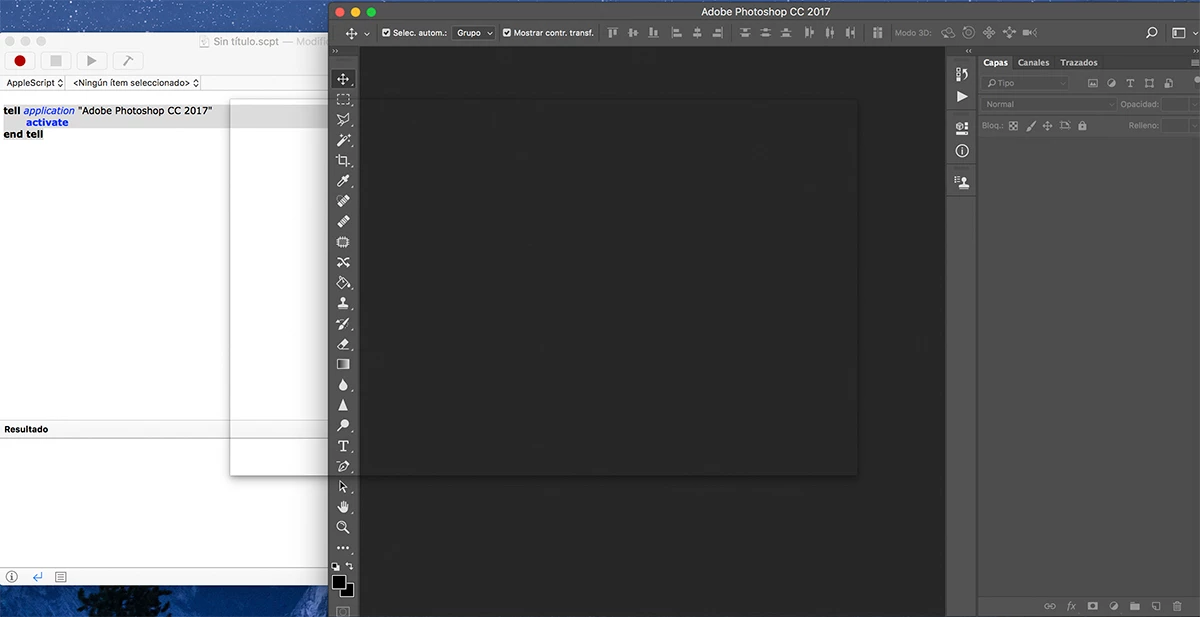
This is a screen capture from an iMac Retina showing Script Editor and CC 2017, you may notice the shadowed rectangle both over the script editor and Photoshop.
By starting first Photoshop it doesn't happens, as far as I know.
Mac is 10.12.1 and Photoshop is 2017.0.0 20161012.r.53 2016/10/12:23:00:00 CL 1094006 x64
Thanks for any help.
 AdChoices