

Answered
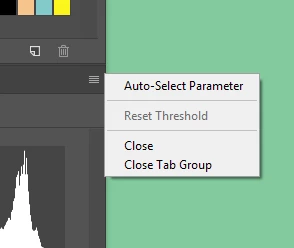
CC 2019 changes the way Adjustment layers are selected, is there any way to disable?
In CC 2019, when you select an adjustment layer, the cursor instantly highlights the first numeric box in the adjustment layers properties box. This causes frustration when you click on the adjustment layer and then press delete, you then have to deal with the error "Invalid numeric entry. An integer between -100 and 100 is required. Previous value inserted."
Its not a huge deal, but it is really annoying when it keeps happening...Is there anyway to turn this off so that it does not automatically highlight the first numeric box. I like a lot of the other changes in 2019, but this one is really driving me nuts haha. Thanks.
 AdChoices