Hi Jack
The history brush allows you to take a point in your history panel then paint onto the image with whatever the colour was in the image at the same location but at that point in history.
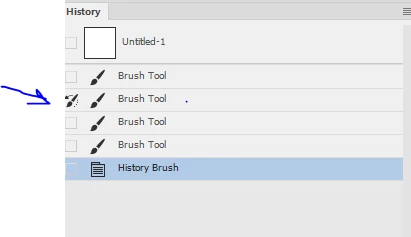
You set the point in the history panel by clicking on the left. So if you look at the example below, I painted with a standard brush 4 times. Then I painted with the history brush and it used the state of the image when I had painted with only the second brush stroke.
You could also use this after say blurring and darkening an image and then paint back in some of the earlier image. before those changes.
The result does not just have to be brushing back in what was previously there. Although that is what will happen if you use brush blending mode Normal and Opacity 100%. You can of course alter both of those for other effects.
I hope that helps
Dave

 AdChoices