
Inspiring
February 1, 2021
Answered

Change the color of clipping mask

  • February 1, 2021
  • 2 replies
  • 968 views

Hello everyone! 

Let's say i created circle.
Then, a layer above it, i created clipping mask and use brush with the color yellow.
Now i wanna leave it as it is just change the yello to red.

how come can i do it?

https://www.youtube.com/watch?v=nXH8-DPhbbk
This topic has been closed for replies.
Correct answer Bojan Živković11378569

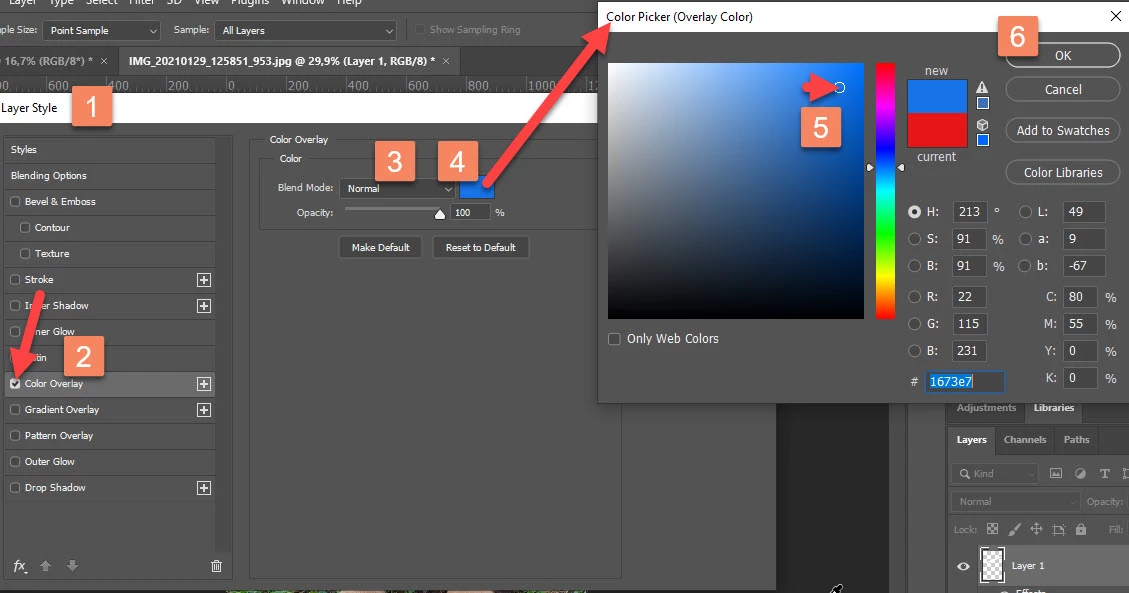
Anoter way is to use Layer effect : Color Overlay with Blending mode set to Normal. 


With layer selected go to Layer > Layer Style > Color Overlay.

2 replies

Bojan Živković11378569
Community Expert
Community Expert
February 1, 2021

Anoter way is to use Layer effect : Color Overlay with Blending mode set to Normal. 


With layer selected go to Layer > Layer Style > Color Overlay.

Grant H
Community Expert
Community Expert
February 1, 2021

Hi, you can add an hue adjustment layer as just one example and colour as you wish.

/G