
Participant
March 1, 2024
Answered

Change to Layer Option List

  • March 1, 2024
  • 2 replies
  • 162 views

Layer Option List (right click on layer) give you a long list of features such as Blending, Rasterize, Merge, etc.


The list shuffles throughout editing a layer. 

By default, Blending Option is up on top.

If layer is rasterised, Blending is transferred to somewhere in middle. 

Same for merge, etc - they all have been relocated in the list.


Very annoying searching every single time to find that.. it is energy and time wasting.

Please restore the list as fixed, no shuffling - like previous versions in the past.
 

This topic has been closed for replies.
Correct answer Jeff Arola

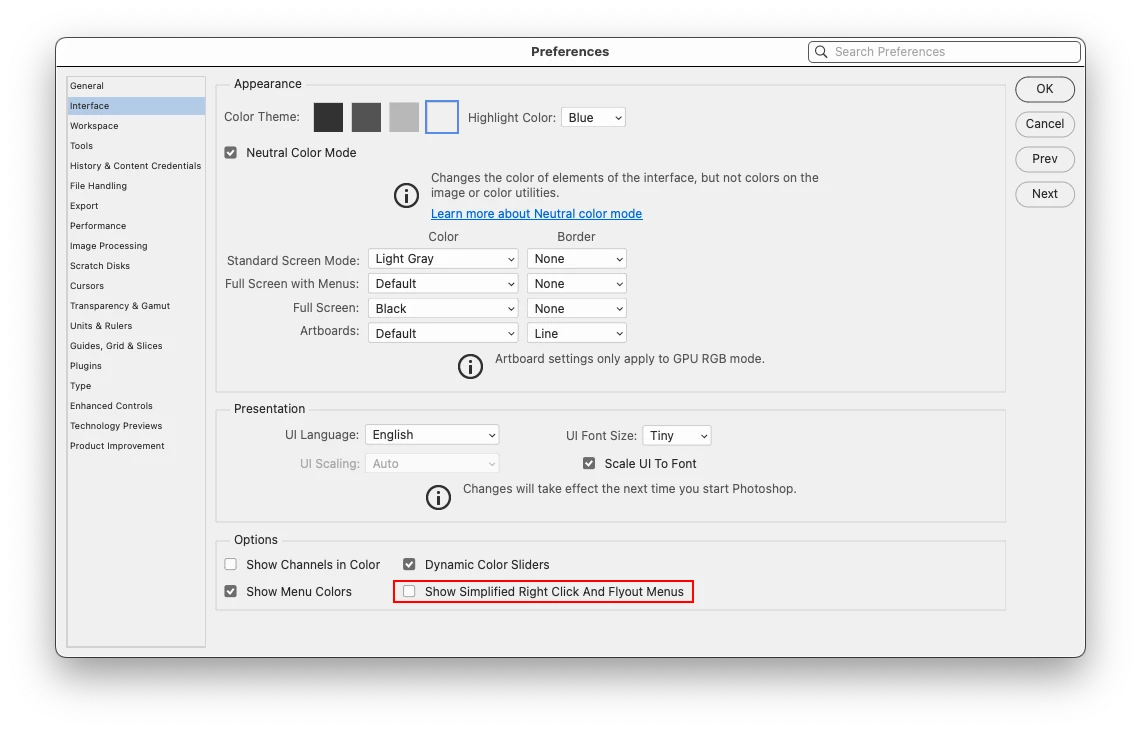
In Photoshop look at Edit>Preferences>Interface and see if you have

Show Simplified Right Click And Flyout Menus checked.

If so, try unchecking it and see if that makes a difference.


2 replies

Participant
March 2, 2024

Hello Jeff and thank you,  it did make the difference.

Jeff Arola
Community Expert
Jeff ArolaCommunity ExpertCorrect answer
Community Expert
March 2, 2024

In Photoshop look at Edit>Preferences>Interface and see if you have

Show Simplified Right Click And Flyout Menus checked.

If so, try unchecking it and see if that makes a difference.