IDM Instruments
Participant
May 3, 2018
Question

Changing background colour

  • May 3, 2018
  • 3 replies
  • 564 views

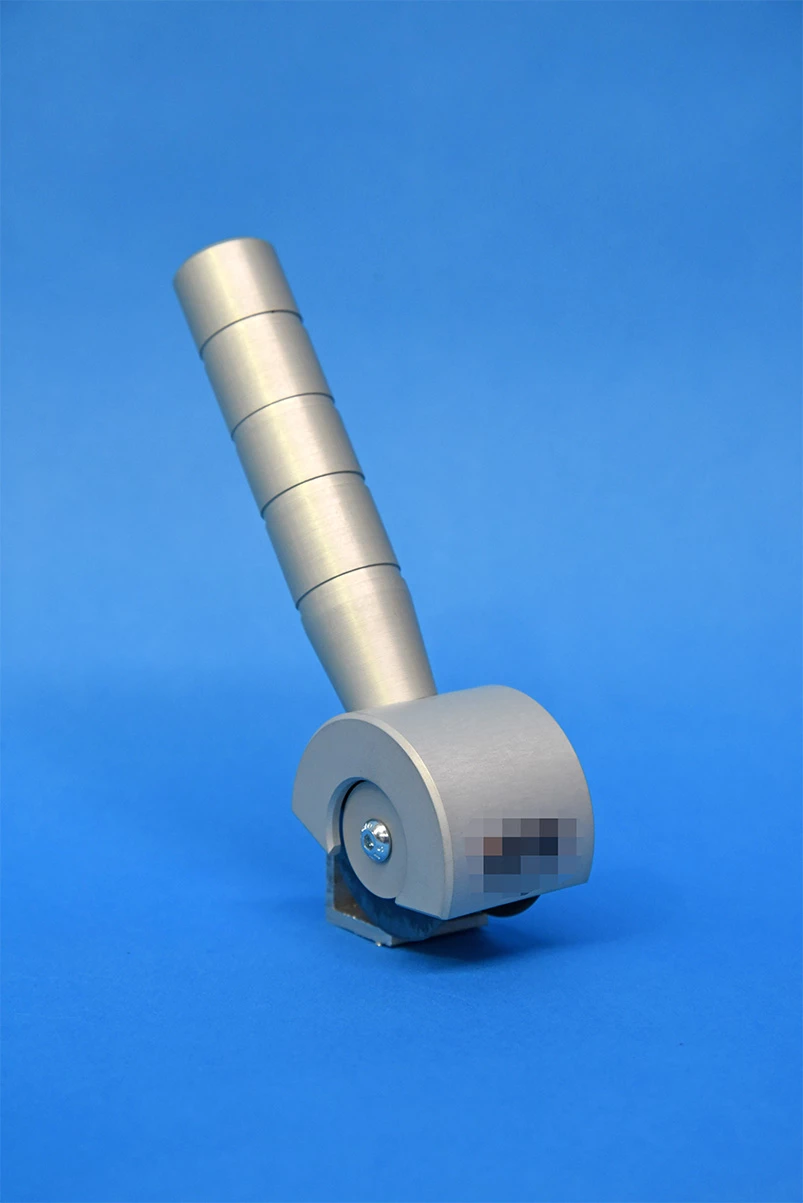
I've shot a product of ours on a blue screen, and want to change the colour of the blue to white, but I can't seem to get a clean enough result.

I've tried selective colour and using the colour range select tool, but it's still giving me some issues.

Any ideas? I've attached the image.
This topic has been closed for replies.

3 replies

davescm
Community Expert
Community Expert
May 3, 2018

An alternative for that image is to add a Hue/Sat layer.

Select Blues and click with the eyedropper on the Blue.

Then turn down Sat to -100 and Lightness up to +100

If you need pure white then you can always add a curve

Dave

IDM Instruments
Participant
May 3, 2018

Thanks for another alternative! Powerful yet quick.

Jeff Arola
Community Expert
Community Expert
May 3, 2018

Put a white layer blow the blue layer and got this result using Layer Style>Blending Options with Blend-If set to Blue and move the right slider left till the blue is almost gone from around the object, then Alt or Option click to split the slider and move the left part of the slider almost all the way to the left.

Then make a new blank layer underneath and merge the object layer down with the blank layer and go to Layer>Matting>Remove White Matte.

IDM Instruments
Participant
May 3, 2018

Thanks for a nice solution! Just goes to show how powerful Photoshop is.

SMOk3420
Inspiring
May 3, 2018

When you say "Clean" do you mean cutting out your product to place on a white background

or is it the Blue reflection that's on it? I've cleaned around where the screw is etc. Is this what you mean?

This is just a rough draft:

Or you could use the "Blend If" in fx

IDM Instruments
Participant
May 3, 2018

Thanks for a solution! This definitely helps.
I ended up doing it in Lightroom which is what I'm more comfortable with, but good to add this trick to my Photoshop arsenal.